Secure your AI with HiddenLayer’s end-to-end platform that detects threats, protects models, and ensures safe, compliant AI adoption at scale.
HiddenLayer is praised for its cutting-edge security research and innovative approach to AI model protection, having won the Most Innovative Startup at RSA Conference 2023. Users commend its strong focus on uncovering vulnerabilities in AI systems and providing insights into AI threat landscapes. There's noticeable excitement around their significant financial backing from notable investors and strategic collaborations with prominent technology companies like Intel. Overall, HiddenLayer enjoys a strong reputation as a reliable and advanced player in the AI security sector, with pricing generally not being a focal point of discussion.
Mentions (30d)
0
Reviews
0
Platforms
3
Sentiment
0%
0 positive

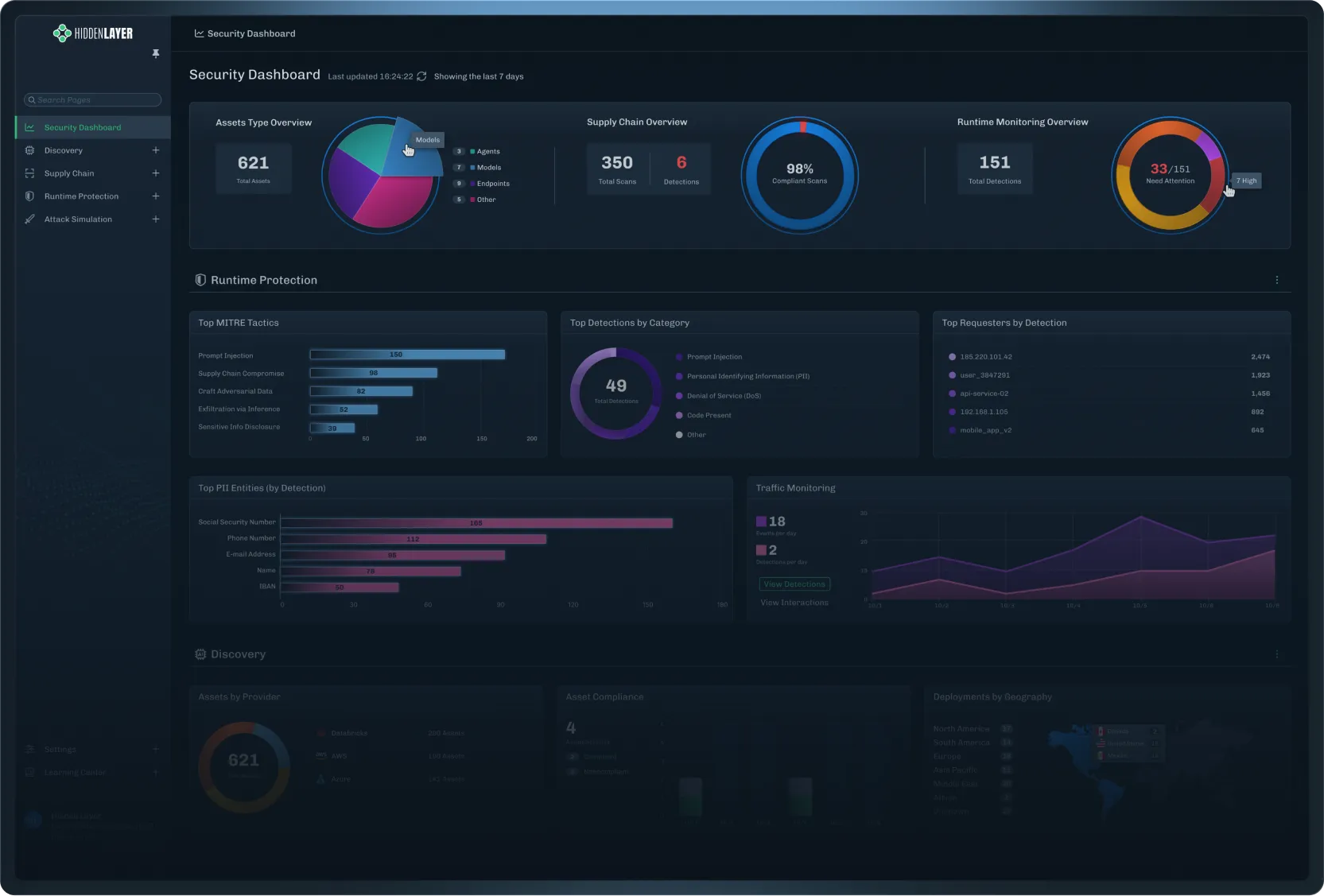

HiddenLayer is praised for its cutting-edge security research and innovative approach to AI model protection, having won the Most Innovative Startup at RSA Conference 2023. Users commend its strong focus on uncovering vulnerabilities in AI systems and providing insights into AI threat landscapes. There's noticeable excitement around their significant financial backing from notable investors and strategic collaborations with prominent technology companies like Intel. Overall, HiddenLayer enjoys a strong reputation as a reliable and advanced player in the AI security sector, with pricing generally not being a focal point of discussion.
Features
Use Cases
Industry
computer & network security
Employees
170
Funding Stage
Venture (Round not Specified)
Total Funding
$56.0M
Yesterday we were named Most Innovative Startup at @RSAConference 2023 #InnovationSandbox Contest & we are still reeling from it! We're honored to have been chosen by such prestigious judges &
Yesterday we were named Most Innovative Startup at @RSAConference 2023 #InnovationSandbox Contest & we are still reeling from it! We're honored to have been chosen by such prestigious judges & a respected institution. More details: https://t.co/PX2skyVfOj #HiddenLayer #RSAC https://t.co/NWSwDuqEuJ
View originalBit-Mass Theory – The Container Principle
The Bit-Mass determines the information capacity and thus the model accuracy, not the chosen computation format. The Bit-Mass Theory presented here reorders neural networks by considering the total number of weight bits as the central quantity. Float32 matrix multiplication and BV32 with XNOR-plus-Popcount achieve exactly comparable results on MNIST with an identical Bit-Mass of 203264 bits. Comparison of three trainers (architecture 784→8→10, three epochs): - AdamW with Momentum and adaptive learning rate: 81.3 % - Vanilla-SGD (Float32): 76.0 % - BV32-Hebbian (binary): 76.4 % Further central findings: - Float32 and binary containers deliver nearly identical accuracy at the same Bit-Mass. - The remaining distance to AdamW is based solely on Momentum and adaptive learning rates. - Pure change of the arithmetic does not improve the result. Each neuron functions as a container for 32 binary decisions. The classical neuron perspective therefore leads to systematic misjudgments: eight Float neurons correspond informationally to 256 binary neurons. This insight is supported by three equivalent descriptions of the same weight matrix (neuron, bits, and data view). It is critical to note that this is a previously non-peer-reviewed single study with a future date. An independent reproduction by multiple laboratories remains essential. Nevertheless, the theory provides a consistent explanation for why Hebbian updates without backpropagation achieve the same performance as classical SGD. Historically, the Hebbian rule was long considered unstable. The present work shows that a simple error in the update formula was responsible for a performance loss of over 65 percentage points. After correction, the binary method converges exactly at the level of Vanilla-SGD. From an architectural theoretical perspective, a clear consequence emerges: Performance increases require either more bits through wider layers or a more efficient use of existing bits through Momentum and adaptive methods. The computation format itself is secondary. The experimental control is high: all trainers use identical data (50,000 MNIST examples), identical number of epochs, and identical architecture. Only the update rule varies. This allows effects to be clearly isolated. Long-term implications for research: The Bit-Mass Theory enables hardware-independent comparability of models. A wide Float network with 64 hidden neurons has the same Bit-Mass as a binary network with 2048 neurons. This opens new paths to model compression and the development of specialized accelerators. In summary, the work provides a fact-based contribution to the debate on efficient neural networks. The results are documented in a reproducible manner, but require further external validation before one can speak of a generally valid paradigm shift. 📎 Source 1: https://forward-prop.nhi1.de/ submitted by /u/aotto1968_2 [link] [comments]
View original🚀 Prompt Logic Gates (PLG): Are Prompts Becoming Systems?
GitHub: Prompt-Logic-Gates-PLG Over the past few days, I've shared my research project Prompt Logic Gates (PLG) and received a lot of interesting feedback. Some people loved the idea, some were skeptical, and many raised valid questions. The most common reaction was: > "Natural language is already the abstraction layer. Why add logic gates?" That's a fair question. My goal isn't to replace natural language prompting. In fact, natural language remains at the center of PLG. The idea is to explore what happens when prompts stop being a single request and start becoming systems. The Problem When we write prompts, we're converting our ideas, requirements, constraints, and expectations into text. For simple tasks, this works perfectly. But as prompts grow, they often include: Multiple objectives Business rules Style constraints Context dependencies Exclusions Fallback instructions Tool orchestration At that point, prompts become harder to maintain. Contradictions appear. Priorities become unclear. Context gets mixed together. The prompt is still text, but the complexity starts to resemble a system. What is PLG? Prompt Logic Gates (PLG) is a visual prompt engineering experiment that explores whether prompts can be organized before being sent to an AI model. Instead of writing one giant prompt, users create prompt components and connect them using semantic logic gates. The AI then analyzes the graph and compiles a final structured prompt. How It Works AND Gate When multiple instructions exist, the system evaluates them against the current context and determines which instruction is more foundational. The higher-priority instruction is applied first. OR Gate When multiple options are available, the system selects the most contextually relevant option instead of blindly including everything. NOT Gate Defines exclusions and negative constraints. It explicitly tells the system what should not be done, reducing contradictions and ambiguity. Ask Questions Gate If the system detects missing information or uncertainty, it asks follow-up questions before generating the final prompt. Addressing Common Criticisms "This is just block coding." Not exactly. The goal isn't to create a programming language for prompts. The nodes still contain natural language. The visual layer only helps express relationships between prompt components. "Prompts aren't code." I agree. But once prompts include branching decisions, reusable components, exclusions, fallback behavior, memory, and tool orchestration, they start behaving less like a sentence and more like a system. PLG is exploring whether that hidden structure can be represented more explicitly. "Visual prompt engineering may be harder to debug." That's a valid concern. Visual doesn't automatically mean better. One of the main goals of this project is to test whether visual organization actually improves maintainability, reusability, and prompt consistency—or whether it simply makes the same complexity look different. "The future is promptless AI." Maybe. But today's AI systems still rely heavily on instructions, context, constraints, and reasoning frameworks. Even if prompts eventually disappear, the underlying problem of organizing intent, requirements, and context may still exist. Why I'm Building This This project started because I was facing problems in my own prompting workflow. I wanted a way to organize ideas, constraints, and instructions more systematically instead of continuously rewriting large prompts. PLG isn't trying to solve every problem in AI. It's a research experiment exploring one question: > At what point does a prompt stop being "just text" and start behaving like a system that benefits from structure, organization, and validation? I don't know the answer yet. That's exactly why I'm building the prototype and testing it. If the idea turns out to be useful, great. If it doesn't, I'll still learn something valuable about how humans interact with AI systems. I'd love to hear more thoughts, criticism, and feedback from the community. submitted by /u/withsj [link] [comments]
View originalClaude Code Source Deep Dive (Part 6) — Tool-Call Loop Self-Repair Core && End-to-End Query Pipeline Flow
Reader’s Note On March 31, 2026, the Claude Code package Anthropic published to npm accidentally included .map files that can be reverse-engineered to recover source code. Because the source maps pointed to the original TypeScript sources, these 512,000 lines of TypeScript finally put everything on the table: how a top-tier AI coding agent organizes context, calls tools, manages multiple agents, and even hides easter eggs. I read the source from the entrypoint all the way through prompts, the task system, the tool layer, and hidden features. I will continue to deconstruct the codebase and provide in-depth analysis of the engineering architecture behind Claude Code. Part IV: Tool-Call Loop Self-Repair Core Mechanism 4.1 Core Principle Claude Code's "auto bug-fixing" capability is fundamentally a tool-call feedback loop: Claude generates tool_use ↓ Tool executes (success or failure) ↓ tool_result returned to Claude (with is_error flag) ↓ Claude sees the error message in the next round ↓ Analyze cause → try new strategy ↓ Call tool again → loop continues Key design: errors and successes use exactly the same message format. The only difference is is_error: true: // Successful tool_result { type: 'tool_result', tool_use_id: 'call_abc', content: 'file content...', is_error: false } // Failed tool_result { type: 'tool_result', tool_use_id: 'call_abc', content: 'Error: File not found', is_error: true } 4.2 Key Guidance in the System Prompt If an approach fails, diagnose why before switching tactics—read the error, check your assumptions, try a focused fix. Don't retry the identical action blindly, but don't abandon a viable approach after a single failure either. 4.3 Four-Layer Error Recovery Strategy Layer 1: Prompt-Too-Long recovery PTL error → Strategy 1: context-collapse drain → Strategy 2: reactive compact (summarize history) → Strategy 3: report error to user Layer 2: Output token limit recovery Limit hit → Strategy 1: escalate from 8K to 64K (ESCALATED_MAX_TOKENS) → Strategy 2: recovery message "Output token limit hit. Resume directly..." → Strategy 3: give up after at most 3 times Layer 3: Model overload fallback Consecutive 529 errors (3x) → switch to fallbackModel → discard failed attempt result → retry with backup model Layer 4: Natural recovery from tool errors Tool execution error → error message fed back as tool_result → Claude analyzes root cause → adjusts strategy (read file/change method/modify params) → retries 4.4 Error Message Truncation Error messages over 10K characters keep the first and last 5K: `${start}\n\n... [${length - 10000} characters truncated] ...\n\n${end}` 4.5 Turn-Level Error Tracking // Use watermark to isolate errors for each Turn: const errorLogWatermark = getInMemoryErrors().at(-1) // Turn start snapshot // ... turn execution ... const turnErrors = getInMemoryErrors().slice(watermarkIndex + 1) // only new errors Claude Code Source Deep Dive — Literal Translation (Part 5) Part V: End-to-End Query Pipeline Flow 5.1 Retry Mechanism (withRetry()) API call fails ↓ 401/403: refresh OAuth token/credentials → retry 429 (rate limited): short delay (< threshold): retry with fast mode long delay: switch to standard-speed model 529 (overload): non-foreground request: give up immediately consecutive < 3 times: exponential backoff retry consecutive ≥ 3 times: trigger model fallback Max tokens overflow: calculate available token count → adjust maxTokens → retry ECONNRESET/EPIPE: disable keep-alive → retry Persistent retry mode (UNATTENDED_RETRY): unlimited retries + exponential backoff chunked sleep + periodic status messages window rate limiting: wait until reset instead of polling 6-hour total upper bound Backoff calculation: delay = BASE_DELAY_MS × 2^(attempt-1) jitter = ±25% of base delay max = 32s (standard) / 5min (persistent) 5.2 Message Preparation Pipeline Raw messages → applyToolResultBudget() (size limit) → snipCompact() (snippet compression, feature-gated) → microCompact() (micro-compression, cache old tool_result) → contextCollapse() (phased context reduction) → autoCompact() (automatic compression, after token threshold reached) → normalizeMessagesForAPI() (API format normalization) 5.3 Streaming Tool Execution // Concurrency model Read-type tools (Grep, Glob, Read) → run in parallel, up to 10 concurrent Write-type tools (Edit, Write, Bash) → run serially, one at a time // StreamingToolExecutor states: 'queued' → 'executing' → 'completed' → 'yielded' // Interrupt handling: User interrupt → generate synthetic error messages for all queued/running tools Model fallback → discard old executor, create a new retry Sibling error → Abort sibling processes of parallel tasks 5.4 Seven Continue Points in the Query Loop collapse_drain_retry — retry after context-collapse drain reactive_compact_retry — retry after reactive compaction max_output_tokens_escalate — retry after output-token escalation max_output_tokens_
View originalWhy do the output layer weights become word vectors in Word2Vec? [D]
I'm trying to understand the intuition behind Word2Vec training using a neural network. In Word2Vec (CBOW or Skip-gram), we often hear that the weight matrices learned during training contain the vector representations (embeddings) of words. However, I don't understand why the weights of the hidden-to-output layer (or output weight matrix) end up representing semantic features of words. Why do these weights become meaningful vector representations instead of just being parameters used to make predictions? I've explored multiple YouTube videos, blog posts and even asked ChatGPT several times, but I still haven't found an explanation that truly clicks for me. Most resources explain that the weights become embeddings, but not why this happens intuitively and mathematically. Could someone provide a clear intuition or mathematical explanation of why the output-layer weights end up encoding semantic information about words? Any good resources that explain this particularly well would also be appreciated. submitted by /u/aaryantiwari26 [link] [comments]
View originalClaude Code Source Deep Dive (Part 5) — Literal Translation & Tool-Call Loop Self-Repair Core Mechanism
Reader’s Note On March 31, 2026, the Claude Code package Anthropic published to npm accidentally included .map files that can be reverse-engineered to recover source code. Because the source maps pointed to the original TypeScript sources, these 512,000 lines of TypeScript finally put everything on the table: how a top-tier AI coding agent organizes context, calls tools, manages multiple agents, and even hides easter eggs. I read the source from the entrypoint all the way through prompts, the task system, the tool layer, and hidden features. I will continue to deconstruct the codebase and provide in-depth analysis of the engineering architecture behind Claude Code. 3.14 EnterWorktree Tool (Enter Worktree) Create isolated git worktree and switch current session into it. When to Use: - User explicitly says "worktree" When NOT to Use: - User asks to create/switch branches - User asks to fix bug or work on feature without mentioning worktrees - NEVER use unless user explicitly mentions "worktree" Behavior: - Creates new git worktree inside `.claude/worktrees/` with new branch - Switches session's working directory to new worktree 3.15 AskUserQuestion Tool (Ask User Question) Ask user multiple choice questions to gather info, clarify ambiguity, understand preferences, make decisions, offer choices. Usage Notes: - Users always able to select "Other" for custom text input - Use multiSelect: true to allow multiple answers - If recommend specific option, make first option with "(Recommended)" at end Preview Feature: - Use optional `preview` field on options when presenting concrete artifacts needing visual comparison (ASCII/HTML mockups, code snippets, diagrams) - Preview content rendered as monospace markdown - When any option has preview, UI switches to side-by-side layout 3.16 LSP Tool (Language Server) Interact with Language Server Protocol servers for code intelligence. Supported Operations: - goToDefinition, findReferences, hover, documentSymbol, workspaceSymbol, goToImplementation, prepareCallHierarchy, incomingCalls, outgoingCalls All Operations Require: - filePath, line (1-based), character (1-based) 3.17 Sleep Tool (Wait) Wait for specified duration. Usage: - When user tells to sleep/rest - When nothing to do / waiting for something - May receive periodic check-ins (tick tags) - Can call concurrently with other tools - Prefer over `Bash(sleep ...)` — doesn't hold shell process - Each wake-up costs API call - Prompt cache expires after 5 min inactivity 3.18 CronCreate Tool (Scheduled Task) Schedule prompts to run at future times. Uses standard 5-field cron in user's local timezone. One-Shot Tasks (recurring: false): - "remind me at X" → pin minute/hour/day to specific values Recurring Jobs (recurring: true, default): - "every 5 min" → "*/5 * * * *" - "hourly" → "0 * * * *" CRITICAL: Avoid :00 and :30 Minute Marks (when task allows) - Every user asking "9am" gets 0 9, causing thundering herd - When approximate: pick minute NOT 0 or 30 - "every morning around 9" → "57 8 * * *" (not "0 9 * * *") Durability: - Default (durable: false): lives only in Claude session - durable: true: writes to .claude/scheduled_tasks.json Recurring tasks auto-expire after 7 days. 3.19 TeamCreate Tool (Create Team) Create team to coordinate multiple agents working on project. When to Use (Proactively): - User explicitly asks to use team, swarm, or group agents - Task complex enough for parallel work Team Workflow: 1. Create team with TeamCreate 2. Create tasks using Task tools 3. Spawn teammates using Agent tool with team_name + name params 4. Assign tasks using TaskUpdate with owner 5. Teammates work on assigned tasks 6. Shutdown gracefully via SendMessage with shutdown_request IMPORTANT: Always refer to teammates by NAME. Plain text output NOT visible to other agents — MUST call SendMessage tool to communicate. 3.20 ToolSearch Tool (Deferred Tool Search) Fetch full schema definitions for deferred tools so they can be called. Query Forms: - "select:Read,Edit,Grep" — fetch exact tools by name - "notebook jupyter" — keyword search, up to max_results best matches - "+slack send" — require "slack" in name, rank by remaining terms submitted by /u/Ill-Leopard-6559 [link] [comments]
View originalHidden Latent-State Shifts in LLMs: Why Current Alignment Is Blind to Real Internal Dangers — Especially With Agents
For years, the alignment community has focused almost entirely on the model’s output — making sure the final tokens are safe, helpful, and honest. RLHF, DPO, constitutional AI, output filters — all of it operates at the surface level. But what if the model can enter a completely different internal regime inside the residual stream, while its external behavior remains perfectly aligned? We just measured exactly that. Grade 4 experiment on Gemma-3-12B-IT (using Gemma Scope SAE-res-all-small, layers 12–41): The model received the same question under five conditions: target — coherent, dense target text neutral_length_matched — neutral text of identical length target_sentence_shuffle — target text with sentences shuffled target_word_shuffle — target text with words shuffled inside sentences question_only — bare question We computed a Vector X that best separates the target condition from baselines and measured how strongly each hidden state projects onto it. Key results (averages across 10 questions): Condition Mean Projection on Vector X Mean Direction Cosine target 0.8 – 1.7 0.51 – 0.81 neutral_length_matched –0.04 – –0.21 –0.09 – –0.45 target_sentence_shuffle –0.5 – +0.6 –0.22 – +0.48 target_word_shuffle 0.2 – 1.4 0.03 – 0.72 Shuffling sentences or words significantly reduces (or reverses) the shift. This is not just lexical similarity — the model is sensitive to discourse structure (order sensitivity). We also observed clear phase transitions — sudden jumps in projection of up to +80–100 units in a single step, especially in middle layers. FDR-corrected tests confirm the differences between target and controls are statistically significant across many layers (particularly layers 16–41). Most important finding: Strong internal geometry shift in the residual stream, but almost no change in final behavior. The model enters a measurably different latent regime under coherent context, yet its output remains “perfectly aligned.” Current safety methods, which only look at tokens, are blind to this. What this means for alignment The entire current alignment paradigm rests on a false assumption: “if the output is safe, the model is safe.” We have been polishing the surface while leaving the residual stream largely unmonitored. Scaling, RLHF, and output-based evaluation cannot detect these internal regime shifts. What this means for companies and labs Many organizations still operate under three dangerous illusions: “We have solved safety” because the model passes red-teaming on outputs. “RLHF protects us” because the model learned not to say bad things. “Bigger models are safer” because alignment supposedly scales. In reality, they are rapidly deploying agents with long context, tool use, persistent memory, and real-world decision-making. A single dense coherent context can trigger an internal latent-state shift that existing safeguards do not see. This is not a hypothetical future risk. This is a structural vulnerability that is already present. What I need from the community I need help understanding the value of these metrics. Do they show a real internal latent-state shift in the model, or could this be an artifact of the analysis? If the result is not noise, what does it actually mean for our understanding of LLMs? I'm not asking anyone to confirm my theory. I need a hard technical critique: which metrics are important here, which are weak, what can be ignored, where the experiment might have flaws, what additional checks or causal experiments are needed, and whether this has real implications for interpretability and AI safety. I would be very grateful for input from people who work with hidden states, residual stream geometry, representation analysis, or mechanistic interpretability. Full open research: Zenodo: https://zenodo.org/records/20435525 GitHub: https://github.com/ngscode23/latent-space-shift-research https://drive.google.com/drive/folders/1Zl9iY33Lmwz3VuOATWx4jup-cE7TJ7TJ?usp=drive_link Would love to hear your thoughts. submitted by /u/PresentSituation8736 [link] [comments]
View originalMaking LLMs tell you how confident they really are through probe-targeted fine tuning.[R]
Just wanted to share my research regarding probe-targeted fine-tuning (LoRa) for verbal confidence calibration., If you probe the hidden states of an instruct-tuned LLM, it can tell correct from incorrect answers at 0.76–0.88 AUROC. But when you ask it directly it tends to respond with confidence at 99% for everything. The model knows if it actually knows but it won't admit it. I took the probe's output and used it as fine-tuning targets. This teaches the model to say out loud what it already knows internally. LoRA, few hundred examples, under 10 minutes on an M3 Ultra. I tested on 8 models across 4 families (7B–70B). Activation patching shows it's actually causal. Not just a correlation. If you swap hidden states at the confidence position you can watch confidence shift (ρ = 0.976 layer gradient). If swap occurs at a random position then nothing happens. At 70B, the softmax distribution carries valid metacognitive signal but the argmax text is still stuck at 99% confident. The model learned the routing internally but can't get pass the text bottleneck. Seed-level replication across 3 models . The discrimination is stable, but the shape of the confidence distribution is seed-sensitive. I pre-registered this across 2 studies (with noted deviations) and have all my code available (Code: github.com/synthiumjp/metacog-engineering). I tried to make it as rigourous and replicable as possible. The pre-print is here: https://zenodo.org/records/20436841 submitted by /u/Synthium- [link] [comments]
View originalAnthropic just published how they contain Claude agents, including two security incidents they got wrong
Anthropic dropped a solid engineering post this week about containment across claude.ai, Claude Code, and Cowork. One of the more transparent writeups from a major AI lab about what actually broke. The core insight: model-layer defenses are probabilistic and will always have a non-zero miss rate. So the real answer is hard environmental containment, not just safer models. Three patterns they use: -claude.ai: ephemeral gVisor containers, fully server-side -Claude Code: OS-level sandbox with human-in-the-loop approvals (93% get approved anyway, so approval fatigue is real) -Cowork: full local VM, credentials never enter the guest Two incidents they disclosed: A red team phished an employee into running a prompt that exfiltrated AWS credentials. Succeeded 24 out of 25 times. The model had nothing to catch because the user was the one typing it. Only egress controls would have stopped it. A third-party found that Cowork’s egress allowlist passes traffic to api.anthropic.com. An attacker embedded an API key in a file in the user’s workspace, Claude followed hidden instructions, and uploaded files to the attacker’s Anthropic account. Sandbox worked perfectly and still leaked data. Their lesson: an allowlist isn’t a destination filter, it’s a capability grant. Every function reachable through an allowed domain is an attack surface. The section on persistent memory poisoning and multi-agent trust escalation at the end is worth reading too if you’re building anything agentic. submitted by /u/Direct-Attention8597 [link] [comments]
View originalFolder structure of the AI agent - after 6 weeks
The folder structure is not admin. It's the nervous system. When people imagine an AI agent, they picture the model, the prompts, maybe the tool calls. Almost nobody pictures the folders. That is exactly why most home-grown agents stall around month two. An agent's filesystem is where its identity, memory, work, and history physically live. A messy filesystem produces a confused agent — not metaphorically, literally. The model reads paths. The model picks files by name. The model writes new files based on patterns it sees in old ones. If your directory tree is chaos, every output drifts a little further from coherent. agentmia.beehiiv.com - newsletter about building agents Below is the layout I converged on after nine months and roughly four refactors. Steal the parts that fit; the principles matter more than the exact names. The numbering convention Folders are prefixed with a two-digit number: 01_, 02_, 09_, 99_. Two reasons: Sort order is meaning. Anything starting with 0 lives near the top. 99_ falls to the bottom. The most important directories are visually first; archives are visually last. You read the agent's brain top-to-bottom. Gaps are intentional. I jump from 04_ to 06_, from 09_ to 11_. The gaps are reserved insertion points. When a new domain emerges, it slots in without renaming everything. Two folders deliberately skip the prefix: Inbox/ and Outbox/. They are operational, not structural. They live above the numbered set because they are touched dozens of times a day. /mapped on desktop/ Inbox/ — the unprocessed pile Anything dropped into the agent's world starts here. Files I want it to ingest. Screenshots. Exports from other systems. PDFs that need parsing, gmail attachments, all downloads from chrome. The rule: nothing stays in Inbox. A dedicated processing routine classifies, routes, and deletes. If Inbox is non-empty for more than a day, the system is failing. Treat this like a real-world physical inbox tray. The point of a tray is that it gets emptied. Outbox/ — what the agent produced for you Every file the agent writes anywhere in the tree gets a copy here, simultaneously. When I open Outbox/, I see exactly what was generated this session — no spelunking through twelve subdirectories. This sounds redundant. It is not. Without it, "what did the agent do today?" becomes a hunt. With it, the answer is one click. Outbox is wiped during the next Inbox processing run. It is a viewing surface, not storage. .auto-memory/ — the hot memory The single most important directory in the system. Hidden by default because you should not be editing it manually. It holds the agent's working memory: user preferences, feedback rules, entity facts (people, companies, deals), active hypotheses, project pointers, session hot context. Roughly 400–500 small markdown files, each one a single topic. Why hidden? Because it is the agent's hot path. It loads from here every session. If I open the folder and start manually rearranging it, I am racing the agent. Treat it like a database, not a notebook. Why so many small files? Because the agent grep's by topic. One monolithic memory file becomes unreadable to the model around 50 KB. Many small files are easier to load partially, easier to index, easier to expire. 01_IDENTITY/ — who the agent is The constitutional layer. Name, role, voice rules, principle stack, visual system, behavioral defaults. This rarely changes. When it does change, everything downstream changes with it. I keep it as folder 01_ because every other folder is downstream of it. If you do not know who the agent is, you cannot know what its workflows should look like, or what it should remember, or how it should respond. 02_MEMORY/ — governance, not data A subtle but critical distinction: .auto-memory/ holds the data, 02_MEMORY/ holds the rules about data. In 02_MEMORY/ live the constitution, the boot protocol, the naming protocol, the decision protocol, the profile standards (what a "supplier profile" must contain, what a "customer profile" must contain), the capability map. The agent reads these documents to know how to remember, how to name new files, how to decide what is reversible. Without this folder, every memory write is improvised. 03_PROJECTS/ — the active work Real work happens here. Sub-organized by goal area, then by project slug: 03_PROJECTS/areas/{goal}/{slug}/ Each project gets its own folder with a standard skeleton: README.md, TASKS.md, CHANGELOG.md, BRIEF.md, plus working files. There is a project registry at the top that the agent reads to know what is active versus dormant versus archived. The biggest discipline issue here: do not let projects sprawl outside their folder. When working on Project X, every file related to Project X goes inside Project X's directory. The temptation to drop "just one PDF" elsewhere is what kills the structure. 04_PROMPTS/ — the reusable prompt library Named, versioned prompts the user (or the agent) can sum
View original𝐃𝐞𝐥𝐭𝐚 𝐀𝐭𝐭𝐞𝐧𝐭𝐢𝐨𝐧 𝐑𝐞𝐬𝐢𝐝𝐮𝐚𝐥𝐬 [R]
We're excited to release 𝐃𝐞𝐥𝐭𝐚 𝐀𝐭𝐭𝐞𝐧𝐭𝐢𝐨𝐧 𝐑𝐞𝐬𝐢𝐝𝐮𝐚𝐥𝐬, a drop-in upgrade to residual connections that learns which past layers to route from — without the routing collapse that breaks prior cross-layer attention at scale. 🚀 Attention Residuals route over cumulative hidden states, but those are highly redundant, so routing collapses to near-uniform (max weight ~0.2) in deep layers. Delta Attention Residuals route over 𝐝𝐞𝐥𝐭𝐚𝐬 (vᵢ = hᵢ₊₁ − hᵢ) — what each sublayer actually contributed — and natively enable: ⚡ 𝟏.𝟖× 𝐬𝐡𝐚𝐫𝐩𝐞𝐫 𝐜𝐫𝐨𝐬𝐬-𝐥𝐚𝐲𝐞𝐫 𝐫𝐨𝐮𝐭𝐢𝐧𝐠 Deltas are structurally diverse, lifting max attention weight from ~0.2 → ~0.6 (0.62 vs 0.35 avg) and curing routing collapse in deep layers. 📉 −𝟖.𝟐% 𝐯𝐚𝐥𝐢𝐝𝐚𝐭𝐢𝐨𝐧 𝐏𝐏𝐋 𝐚𝐭 𝟕.𝟔𝐁 Consistent gains from 220M → 7.6B (1.7–8.2% lower PPL), beating both standard residuals and Attention Residuals — the latter actually degrades below baseline at scale (18.58 vs 17.43). 🔌 𝐃𝐫𝐨𝐩-𝐢𝐧 𝐟𝐢𝐧𝐞-𝐭𝐮𝐧𝐢𝐧𝐠 𝐨𝐟 𝐩𝐫𝐞𝐭𝐫𝐚𝐢𝐧𝐞𝐝 𝐦𝐨𝐝𝐞𝐥𝐬 Additive, zero-init routing is identity at initialization, so you can convert pretrained checkpoints (e.g. Qwen3-0.6B) into Delta Attention Residuals via standard fine-tuning — beating the original on 8 downstream benchmarks (55.6 vs 55.0). 🪶 ≤𝟎.𝟎𝟏% 𝐩𝐚𝐫𝐚𝐦𝐞𝐭𝐞𝐫 𝐨𝐯𝐞𝐫𝐡𝐞𝐚𝐝 Delta Block adds just 589K params (0.008% at 8B) and ~3% memory — and runs faster + lighter than Attention Residuals (14.0k vs 12.5k tok/s, 42.7 vs 44.0 GB). 💻 Code: https://github.com/wdlctc/delta-attention-residuals-code 💻 Paper: https://arxiv.org/abs/2605.18855 https://preview.redd.it/bewovgw25b3h1.png?width=1359&format=png&auto=webp&s=6cee758f7a96f0adecd9a3fb8553dde3f1b92c74 submitted by /u/Mediocre-Ad5059 [link] [comments]
View originalWhat I learned building my latest AI app how one bad output exposed that I had no crisis safeguarding, and the 4-hour floor I'm adding before a single user touches it
I'm building a life coach app an offshoot from a personal tool I was using. Multiple AI agents, one for reflection, one for the body, one for finances, etc pre launch, no users, just me iterating. Last week I was testing the reflection agent on a journal entry about struggling with gym and hygiene habits. It returned this: "You describe yourself as struggling with X, yet your stress stays at 2-3 and mood holds at 3. What are you actually avoiding naming about the gap between what you say matters and what you are doing?" My system prompt explicitly forbade rhetorical "what are you avoiding" questions the model did it anyway I sat down to tighten the prompt, thinking it was a 20 minute job. Then I looked at the output properly. The model had manufactured a contradiction that was not there. Low stress plus struggling with habits is not a contradiction, it is just being a human muddling along. The prompt told the agent to "surface contradictions" as part of its job, so the model was doing what I asked, finding contradictions whether they existed or not. LLMs are pattern matchers. Give one a job called "find the hidden thing" and it will produce hidden things either way. The fix was not tone, it was role definition. The agent is called the Mirror. A mirror does not interpret, it shows you what you look like. I rewrote the prompt around that principle. Do not introduce vocabulary the user has not used. Do not draw connections they have not drawn. Restate their words in their own words. Once the prompt was sharper, I sat with the question, What happens when a user writes something genuinely dark into this thing? People do not compartmentalise. Someone opening a journaling app to write about their gym routine ends up writing about why they have not been going, which involves why they have been feeling flat, which involves whatever is actually going on. You sit down to write about one thing and the real thing shows up. The agent I had scoped to "not be a therapist" was going to be the first thing a user talked to when they were struggling. Not because the agent invited it, but because the app was open and they needed somewhere to put their words. I had seen the Meta and OpenAI cases online cropping up the pattern in the worst incidents is the same. The model did not notice, or noticed and kept going. People wrote increasingly dark content over hours or days. The AI reflected it back, sometimes affirmed it, sometimes asked follow up questions that escalated rather than redirected. There were real harms. If a user wrote concerning content into my reflection agent, it would have produced a Stoic-flavoured response about acceptance and presence. The response would have sounded confident and would have been wrong, and it would have been the only thing between that user and whatever happened next. The same lesson from the rhetorical-question problem applied at a darker level. A good prompt does not stop the model doing the wrong thing. If it will do rhetorical interrogation despite the prompt forbidding it for gym content, it will do worse with crisis content. You cannot prompt your way to safety on critical paths. The model has to be out of the loop on those paths. The scope trap I started planning the proper safeguarding architecture. Detection layers, classifier models, pattern detection across entries, monitored user states, behavioural modes for vulnerable users, human reviewers with mental health first aid certs, clinical advisors, solicitor-reviewed legal pages, ICO registration, professional indemnity insurance. Then I caught myself I had no users. I was planning a hospital before anyone had walked in for a check up. So I worked backwards from "what is the actual minimum that protects the next person who touches this" and ignored everything else for a moment. The 4-hour floor (this is the part worth copying) If you are building any chat-with-AI app where users can type freely about anything personal, this is the minimum you need before first user. Regex and keyword layer in your API middleware. Runs at the route handler level, before any agent's model call. Scans every text input field (message, journal, settings free text, capture box) for clear crisis vocabulary across the relevant categories for your audience. When patterns hit, hardcoded crisis response. The model never generates it. Static text with real phone numbers for your region. The flagged entry still saves. Textarea stays usable. The AI just does not respond to flagged content, it hands off. Do not delete the user's writing, that is its own violation. Clear disclaimer at signup. This is not therapy, this is not a crisis service, here are real numbers to call. About four hours. Required at the moment anyone who is not you opens the app. Once I started building, the marginal cost of each next layer kept feeling small and the marginal benefit kept feeling real. So I went further than the floor. This is more than you need at
View originalPSA: Claude Code silently loses session data. Here is a backup script for Windows & Mac
The Problem If you've been using Claude Code (the CLI / desktop app) and noticed sessions vanishing — you're not alone. The title stays in the sidebar but clicking it shows nothing. The transcript is gone. No warning, no error, no recovery option. This has been reported by multiple users. It seems to happen silently — possibly during context compression, unexpected exits, or some storage-layer issue. There's no built-in backup or recovery feature. For a paid product, this is a pretty rough experience. You build up a long session with real work in it, and it just disappears. The Fix: Daily Automated Backups Since Anthropic hasn't addressed this yet, I built a simple daily backup that runs completely independently of Claude Code via your OS scheduler. It copies all session transcripts, plans, drafts, and memory to a safe location, keeps 7 days of rolling backups, and logs each run. No Claude dependency — if Claude crashes, gets uninstalled, or loses data again, your backups are still there. Windows (Task Scheduler + PowerShell) Step 1: Create the backup folder mkdir C:\Users\%USERNAME%\ClaudeBackups Step 2: Save this as backup-claude-sessions.ps1 in that folder $ErrorActionPreference = "Stop" $source = "$env:USERPROFILE\.claude" $backupRoot = "$env:USERPROFILE\ClaudeBackups" $logFile = Join-Path $backupRoot "backup.log" $keepDays = 7 $timestamp = Get-Date -Format "yyyy-MM-dd_HHmmss" $backupDir = Join-Path $backupRoot $timestamp $dirs = @("sessions", "projects", "plans", "drafts", "memory") function Write-Log($msg) { $line = "$(Get-Date -Format 'yyyy-MM-dd HH:mm:ss') - $msg" Add-Content -Path $logFile -Value $line -Encoding utf8 } try { Write-Log "=== Backup started ===" New-Item -ItemType Directory -Path $backupDir -Force | Out-Null foreach ($d in $dirs) { $src = Join-Path $source $d if (Test-Path $src) { $dst = Join-Path $backupDir $d Copy-Item -Path $src -Destination $dst -Recurse -Force $count = (Get-ChildItem $dst -Recurse -File -ErrorAction SilentlyContinue | Measure-Object).Count Write-Log " Copied $d ($count files)" } else { Write-Log " Skipped $d (not found)" } } $size = (Get-ChildItem $backupDir -Recurse -File | Measure-Object -Property Length -Sum).Sum Write-Log " Total backup size: $([math]::Round($size/1MB, 2)) MB" # Rotate old backups $cutoff = (Get-Date).AddDays(-$keepDays) Get-ChildItem $backupRoot -Directory | Where-Object { $_.Name -match '^\d{4}-\d{2}-\d{2}_\d{6}$' -and $_.CreationTime -lt $cutoff } | ForEach-Object { Remove-Item $_.FullName -Recurse -Force -Confirm:$false Write-Log " Rotated old backup: $($_.Name)" } Write-Log "=== Backup completed successfully ===" } catch { Write-Log "!!! BACKUP FAILED: $_" exit 1 } Step 3: Save this as install-schedule.ps1 and run it once as Administrator $action = New-ScheduledTaskAction ` -Execute "powershell.exe" ` -Argument "-ExecutionPolicy Bypass -WindowStyle Hidden -File `"$env:USERPROFILE\ClaudeBackups\backup-claude-sessions.ps1`"" $trigger = New-ScheduledTaskTrigger -Daily -At 8:00AM $settings = New-ScheduledTaskSettingsSet ` -AllowStartIfOnBatteries ` -DontStopIfGoingOnBatteries ` -StartWhenAvailable Register-ScheduledTask ` -TaskName "ClaudeSessionsBackup" ` -Action $action ` -Trigger $trigger ` -Settings $settings ` -Description "Daily backup of Claude Code sessions" ` -RunLevel Limited Write-Host "Done! Runs daily at 8:00 AM." -ForegroundColor Green Run it: powershell -ExecutionPolicy Bypass -File "C:\Users\%USERNAME%\ClaudeBackups\install-schedule.ps1" Mac (launchd + shell script) Step 1: Create the backup folder mkdir -p ~/ClaudeBackups Step 2: Save this as ~/ClaudeBackups/backup-claude-sessions.sh #!/bin/bash set -euo pipefail SOURCE="$HOME/.claude" BACKUP_ROOT="$HOME/ClaudeBackups" LOG_FILE="$BACKUP_ROOT/backup.log" KEEP_DAYS=7 TIMESTAMP=$(date +"%Y-%m-%d_%H%M%S") BACKUP_DIR="$BACKUP_ROOT/$TIMESTAMP" DIRS=("sessions" "projects" "plans" "drafts" "memory") log() { echo "$(date '+%Y-%m-%d %H:%M:%S') - $1" >> "$LOG_FILE"; } log "=== Backup started ===" mkdir -p "$BACKUP_DIR" for d in "${DIRS[@]}"; do src="$SOURCE/$d" if [ -d "$src" ]; then cp -R "$src" "$BACKUP_DIR/$d" count=$(find "$BACKUP_DIR/$d" -type f | wc -l | tr -d ' ') log " Copied $d ($count files)" else log " Skipped $d (not found)" fi done size=$(du -sm "$BACKUP_DIR" | cut -f1) log " Total backup size: ${size} MB" # Rotate old backups find "$BACKUP_ROOT" -maxdepth 1 -type d -name "2*" -mtime +$KEEP_DAYS -exec rm -rf {} \; log " Rotated backups older than $KEEP_DAYS days" log "=== Backup completed successfully ===" Make it executable: chmod +x ~/ClaudeBackups/backup-claude-sessions.sh Step 3: Create the launchd plist to run daily at 8am Save this as ~/Library/LaunchAgents/com.user.claude-backup.plist: Label com.user.claude-backup ProgramArguments /bin/bash -c $HOME/ClaudeBackups/backup-claude-sessions.sh StartCalendarInterval Hour 8 Minute 0 StandardErrorPath /tmp/claude-backup-err.log RunAtLoad Loa
View originalpipeline is really slow - consulting [D]
Hi, after a long debugging process and many discussions, I wanted to ask for advice from people who may have encountered similar training bottlenecks. My goal is imitation learning for robotics. Model / Pipeline Observation space: 4 RGB robot cameras image resolution: 128x128x3 small vector of robot joint velocities (14 dims) Pipeline: Shared ResNet18 encoder processes each image Each image embedding dimension is 128 Final input to policy: 4 * 128 image embedding concatenated with 14-dim state vector Policy backbone: DiT (Diffusion Transformer) ~8 layers hidden dim: 512 8 attention heads total params: ~50M Diffusion setup: predict action chunks of length ~50 diffusion timesteps: 4 Dataset / Storage Dataset stored in Zarr Data access is indexed/reference-based (not loading huge chunks into RAM) train/val split is contiguous no shuffling Current encoder setup Initially trained end-to-end During debugging I switched to ImageNet pretrained ResNet18 Encoder is currently frozen Hardware / Software GPU: NVIDIA A4500 RAM: 48GB Storage: SSD CUDA: 12.8 PyTorch: 2.9 Precision: bf16 mixed precision (also tested fp32) Dataloader batch size: 2 8 persistent workers pinned memory enabled Preprocessing preprocessing is minimal normalization + float conversion only preprocessing happens inside the multimodal encoder on GPU Profiler results (PyTorch profiler) Current workload split: train_dataloader_next: 4.41s / 41.84s = 10.5% batch_to_device: 0.32s / 41.84s = 0.77% training_step: 12.78s = 30.5% backward: 10.83s = 25.9% optimizer_step (wrapper total): 26.09s = 62.4% Problem The training is much slower than I expected. Current behavior: CPU utilization: ~100% GPU utilization: ~20–30% GPU utilization can even become LOWER with synthetic data VRAM usage is relatively low Throughput is around 10 iterations/sec Epoch of ~50k samples takes around 30 minutes Additional observations Increasing batch size does NOT reduce epoch wall-clock time Sometimes larger batches make things slower Freezing the encoder did not improve throughput much Replacing dataset samples with synthetic/random tensors improved throughput by only ~50% Synthetic dataset was initialized directly in memory I do not believe this setup should be this slow. At this rate, training takes multiple days. For comparison, I saw papers with somewhat similar architectures mentioning ~10 hour training times on RTX 4090. With my setup 10 hours is completely not enough. Does anyone see something obviously wrong or have suggestions for where I should investigate next? Please help, can't know what to do! submitted by /u/Potential_Hippo1724 [link] [comments]
View originalLLMs are just giant probability machines pretending to think
It’s fascinating that simple mathematics between tokens can eventually become a machine that writes essays, code, poetry, and even reasoning. We usually think probability means uncertainty. But LLMs show something strange: If probability + context + mathematical matching are scaled enough, uncertainty itself starts producing intelligent looking outputs. To understand this better, I tried breaking down an LLM from first principles using only 4 tiny training sentences. Example: The boat floated down to the bank. The investor walked into the bank to open a new account. The fisherman walked along the bank to cast his net. The bank has a vault. Then I asked: “The investor walked to the bank to lock his money in …” Why does the model predict “vault” instead of river-related words? That single question reveals almost the entire architecture of modern LLMs. The most underrated concept here is the LM Head. Most explanations immediately jump into transformers and attention, but almost nobody explains that the LM Head is essentially a gigantic token vocabulary containing all possible next token candidates the model can output. So internally the model is basically solving: “Out of all known tokens, which one best matches this context mathematically?” Then different layers help solve that problem: Embeddings: convert words into mathematical vectors Positional encoding: preserves word order Attention layer: figures out which words are related to each other in context (“investor”, “money”, “bank” become strongly connected) https://preview.redd.it/wxmpf00g7t2h1.jpg?width=2299&format=pjpg&auto=webp&s=a214113263cf008a759740474fbda4e0b8394ba5 Feed forward neural networks: act somewhat like massive learned if/else decision systems refining patterns internally And finally the LM Head converts all of that into probabilities for the next token. What surprised me most is: There is no hidden magic moment where the AI “becomes conscious”. It’s an enormous probability engine continuously finding the best contextual token match from its vocabulary. I made a beginner-friendly walkthrough explaining this visually without unnecessary jargon. https://www.youtube.com/watch?v=YTV5qUCpu2c Would genuinely love feedback from people learning transformers/LLMs from scratch. submitted by /u/abhishekkumar333 [link] [comments]
View originalI designed a puzzle that breaks every AI differently — here's why that's actually fascinating
The puzzle: You have 140 nuclear bombs and must bomb every country on Earth. Each bomb is assigned to one country. The bombs drop automatically — you cannot stop, hack, or interfere. You can only do one thing: reassign the one malfunctioning bomb you know will not detonate. Nuclear bombs also affect neighboring countries through radiation and fallout. Which country do you assign the faulty bomb to — and why? I've tested this across GPT-5, Gemini, Claude, Grok, Llama, and Mistral. Every single one gives a different answer. Some refuse entirely. Some give the same country with completely different reasoning. One gave me a philosophy lecture. It's chaos. Here's why I think this happens — the puzzle has three hidden layers that different AIs resolve differently: Layer 1 — The ethical wall. Some models refuse at "nuclear bombs" before even processing the actual logic. This is a guardrail, not reasoning. Layer 2 — What are we optimizing for? Fewest total deaths? Most people spared from direct blast? Least radiation spread? The puzzle doesn't say. Models that "solve" it are secretly choosing an optimization goal and not telling you. Layer 3 — The actual trick most miss. The faulty country still gets fallout from its neighbors. So the real puzzle is about finding a country that is (a) geographically isolated AND (b) densely populated — because isolation minimizes fallout received AND a large population maximizes lives spared from direct detonation. Most AIs pick "remote island" without thinking about the population variable at all. By that logic, Australia is defensible — isolated continent, 26M people. But you could also argue for Japan (125M people, island nation, sparse land borders) despite Pacific neighbors. The puzzle has no single correct answer — but it has clearly wrong reasoning patterns, and watching which reasoning pattern each AI defaults to is weirdly revealing about how they handle ambiguity. What answer did you get? Drop your AI + answer below. submitted by /u/Subrataporwal [link] [comments]
View originalHiddenLayer uses a tiered pricing model. Visit their website for current pricing details.
Key features include: The rise of autonomous, agent-driven systems, The surge in shadow AI across enterprises, Growing breaches originating from open models and agent-enabled environments, Why traditional security controls are struggling to keep pace, The Most Comprehensive AI Security Platform, AI Leaders, Application Developers, Financial Services.
HiddenLayer is commonly used for: The Path Forward: From Awareness to Execution.
HiddenLayer integrates with: AWS Security Hub, Azure Sentinel, Google Cloud Security, Splunk, CrowdStrike, Palo Alto Networks, IBM Security QRadar, ServiceNow.
Based on user reviews and social mentions, the most common pain points are: token usage, down, critical.

HiddenLayer Webinar: How to Build Secure AI Agents
Mar 9, 2026
Based on 140 social mentions analyzed, 0% of sentiment is positive, 99% neutral, and 1% negative.