
AI-first pull request reviewer with context-aware feedback, line-by-line code suggestions, and real-time chat.
Users generally praise CodeRabbit for its reliability and efficiency in coding tasks, often highlighting its capacity to streamline development processes and handle complex code requirements effectively. However, there are complaints about its lack of understanding of specific business rules and the inability to handle personalized tasks without additional guidance. Sentiments regarding pricing are not explicitly discussed, suggesting that the cost may not be a major factor in user dissatisfaction or approval. Overall, CodeRabbit has a strong reputation among users, with consistently high ratings and widespread appreciation for its capabilities.
Mentions (30d)
11
Avg Rating
4.7
20 reviews
Platforms
2
Sentiment
13%
6 positive

Users generally praise CodeRabbit for its reliability and efficiency in coding tasks, often highlighting its capacity to streamline development processes and handle complex code requirements effectively. However, there are complaints about its lack of understanding of specific business rules and the inability to handle personalized tasks without additional guidance. Sentiments regarding pricing are not explicitly discussed, suggesting that the cost may not be a major factor in user dissatisfaction or approval. Overall, CodeRabbit has a strong reputation among users, with consistently high ratings and widespread appreciation for its capabilities.
Features
Use Cases
Industry
information technology & services
Employees
170
Funding Stage
Series B
Total Funding
$79.6M
Level up your Claude Code workflow: 8 tips for better quality control
To get production-ready code out of an LLM, you need to incorporate feedback loops and verification directly into the terminal session. 1. **Force clarifying questions:** explicitly tell Claude: "Ask me questions until you are 95% sure of the requirements". It eliminates the back-and-forth later. 2. **Incorporate auto-verification in To-Dos:** add verification steps to your task list. Example: "Build the UI, then take a screenshot and check for layout errors before asking for my feedback". 3. **The Early Exit:** if you see Claude heading down a rabbit hole, hit `Esc` immediately. Don't waste tokens on a wrong path; correct the course and re-prompt. 4. **Aggressive Output Challenges:** if the first result is just "okay", tell it to scrap it and try a more elegant approach. Claude often performs significantly better on the second pass. 5. **Use /reset for clean breaks:** when switching tasks within the same project, use the slash command to clear the conversation while keeping the underlying project context. 6. **Leverage Vision:** Claude can "see". Give it screenshots of error messages or UI bugs. It can analyze the layout and suggest fixes based on visual data. 7. **Chrome DevTools Integration:** Claude can open a browser to interact with your app and check functionality. Use this to automate form filling and front-end testing. 8. **Clone by Inspiration:** provide a screenshot of a site you like and tell Claude to "recreate these design patterns". It’s much faster than manually describing CSS layouts.
View originalPricing found: $24 /mo, $48 /mo, $0 /mo, $0 /mo, $0.50
g2
What do you like best about CodeRabbit?I really appreciate how CodeRabbit significantly reduces the reliance on another developer in the code review process, allowing me to continue my work in minimal time. It gives me the confidence that my code does not include serious bugs and code smells, which is incredibly reassuring. I also enjoy its seamless integration with GitHub Actions, making it easier to respond to comments directly. The initial setup of CodeRabbit was very easy, which saved me a lot of time and effort. Review collected by and hosted on G2.com.What do you dislike about CodeRabbit?I find it problematic that, like other AI tools, sometimes CodeRabbit becomes unstoppable and generates useless comments. This can be frustrating and require additional effort to handle. Review collected by and hosted on G2.com.
What do you like best about CodeRabbit?The product itself has proven quite useful. It has already spotted a great number of issues that we definitely would not have spotted ourselves. We rely on it every single day. It's pretty easy to get started and to customise the rules and settings on the online panel - although jumping between repo settings and org settings is a bit awkward UX-wise. The sales and onboarding processes were very accommodating, even if a bit slow. Review collected by and hosted on G2.com.What do you dislike about CodeRabbit?By far the biggest downside of CodeRabbit is their customer support. They have a chatbot that only exists to pre-fill an email. Despite the bot asking for my email address (which they already have on file), they sent the response to my request to our billing contact's email instead. When I pointed this out as a fairly glaring security lapse, their response completely ignored that. Further contacts went unanswered entirely. Review collected by and hosted on G2.com.
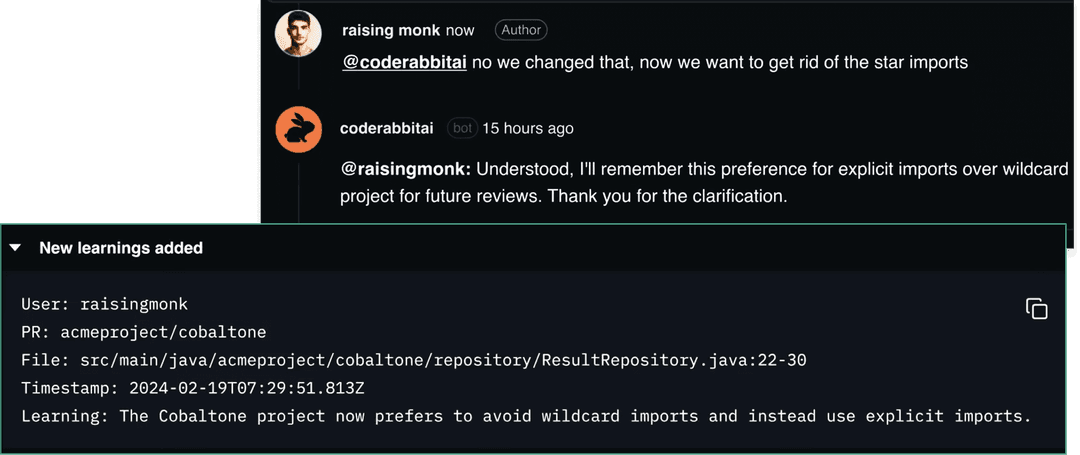
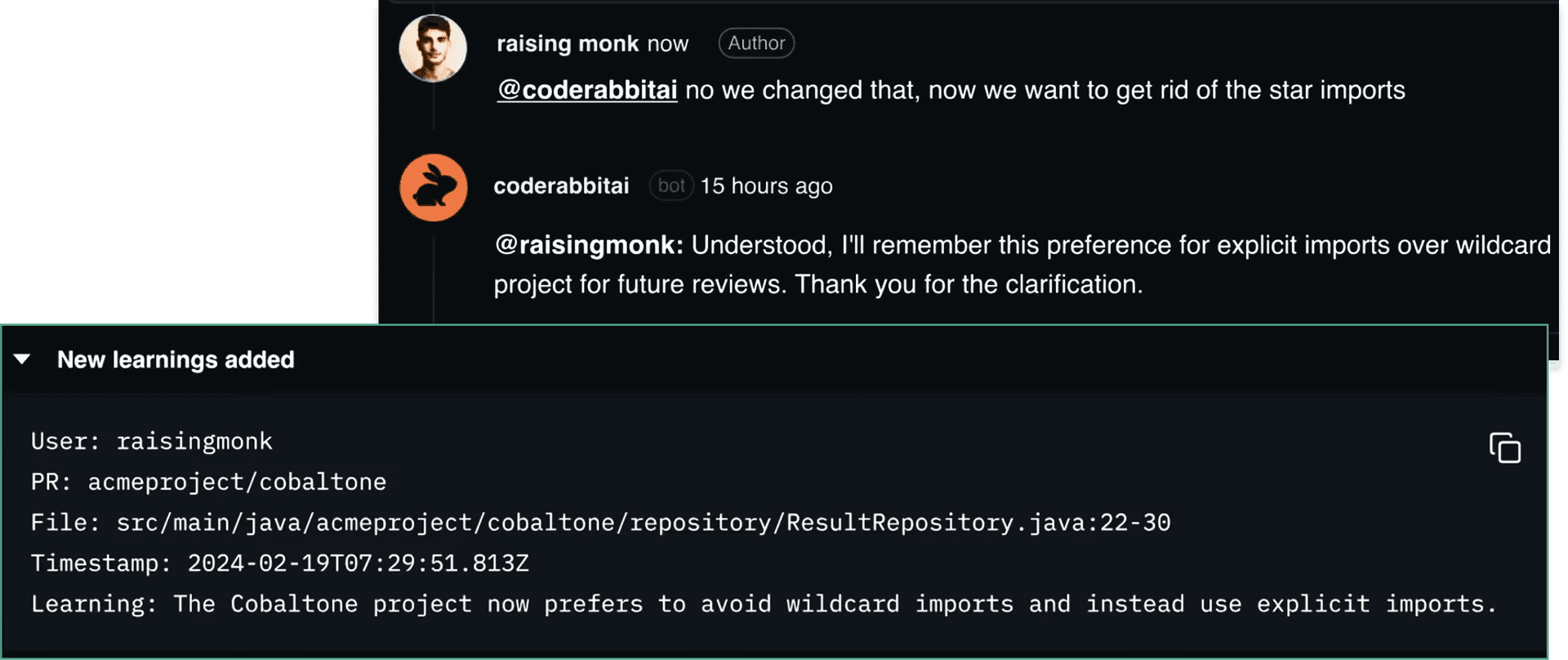
What do you like best about CodeRabbit?It's pretty good to maintain good code quality and prevent potential bugs, it catches them directly in the PR and even suggest code changes directly, saves tons of time. In case of false positive, you can easily tell it to ignore it next time and it'll keep it in mind for future PRs, same for code style, preferences, etc.. Pretty much anything Review collected by and hosted on G2.com.What do you dislike about CodeRabbit?Although it is pretty good and I'm 99% happy with what it suggests, it can happen that some times some suggestions arent that great or valuable, but this is an AI and it's pretty much to be expected, you can always easily discard them and let it know so it doesn't do it again. Review collected by and hosted on G2.com.
What do you like best about CodeRabbit?- easy to use, easy to converse with and interact with - easy to implement Review collected by and hosted on G2.com.What do you dislike about CodeRabbit?I wish there was a progress meter or something when it is reviewing. Review collected by and hosted on G2.com.
What do you like best about CodeRabbit?Its easy to review prs with the help of ai summaries make the tasks abit simpler for me to review prs of anyone Review collected by and hosted on G2.com.What do you dislike about CodeRabbit?sometimes it pauses the auto reviews which we need to trigger manually soo yeah Review collected by and hosted on G2.com.
What do you like best about CodeRabbit?- It explains analyzed PRs with diagrams and detailed descriptions, which really helps to review them later and make sure that the code does exactly what was expected - It provides good quality code reviews, detecting bugs, not optimal implementations, missing tests, and suggests improvements - It learns from feedback and communication with humans and does next reviews better - It saves PR reviewers a lot of time by checking all the prerequisites. Review collected by and hosted on G2.com.What do you dislike about CodeRabbit?- It is unstoppable in its suggestions, providing comments and change requests even to the code, it suggested in previous iterations, so the process can run forever - It still makes mistakes, and even after I ask to verify the suggestion or the fix, it is going to post, before the posting, it still doesn't do that, so we need to run another iteration of our discussion to verify it and correct if needed. Review collected by and hosted on G2.com.
What do you like best about CodeRabbit?The review process has sped up greatly on my team. We less worry about nitpick comments manually and leave the reviewer up to reviewing the PR as a whole. The automation here is great! Far deeper than I expected it to. Comittable comments are lovely. Review collected by and hosted on G2.com.What do you dislike about CodeRabbit?Only thing I can find is that there isn't a way to disable code review at an individual repo. I can edit lint rules and other settings. However I have some projects that I just don't care about automation and I would just rather have it skipped altogether. Review collected by and hosted on G2.com.
What do you like best about CodeRabbit?I've been using code rabbit since the old days when it just used to be a GitHub action. Now it's a one step install GitHub app and it's become even more convenient. Although I miss self hosting it, infact I still do a patched GitHub app from the old GitHub action, I can't sent that coderabbit has been awesome in adding new features and quality prompts/prompting techniques. It really feels like the PR Review is there to help you, not just to say oh we got this cool this done by AI. Review collected by and hosted on G2.com.What do you dislike about CodeRabbit?I understand that it requires funds to run an org, but yeah, it's sad that coderabbit isn't mit or gpl anymore, though it's not that hard to make a GH app out of thier old GitHub actions, but I'd still recommend using their services since they improve so much so frequently. Review collected by and hosted on G2.com.
What do you like best about CodeRabbit?Surprisingly, CodeRabbit's PR summaries, auto generated diagrams and table providing an overview of changes in each file ended up being one of the most helpful things for our team. This was especially true in complicated PRs but also helped when team members reviewed code from projects they weren't as familiar with. Review collected by and hosted on G2.com.What do you dislike about CodeRabbit?For a larger team, we found that sometimes CodeRabbit's PR feedback was a bit too much and added to the noise of PR reviews, even when set to a lower frequency setting. For some projects, this detail was more useful (e.g. front end web) and for others less so (e.g. back end). Review collected by and hosted on G2.com.
What do you like best about CodeRabbit?When working on a project as a solo contributor, CodeRabbit gives you a "second set of eyes" to verify your work, and check for things as simple as spelling mistakes, to proper error handling, interface definition, and more. I especially appreciate how the github integration works seamlessly, allowing me to spend more time focusing on solving problems, and less time on tooling. It suggests test suites, which is wonderful for devs who don't have the capacity to write a thorough set of e2e tests from scratch. Best feature has to be that it's free for open-source projects, so I am able to deliver higher-quality code without taking on a financial burden. Finally, it also adjusts to feedback, so if it suggests something incorrect, you can refine its behaviour by responding with natural language. Review collected by and hosted on G2.com.What do you dislike about CodeRabbit?Some of the recommendations are nonsensical or just plain incorrect. At times, the suggested code changes result in a broken state. Overall, it's not a code author, so you cannot treat it as one - engage in a review process with it as if it were a junior developer who has a lot of knoweldge, but little practical experience, and you will probably find it of some use. Review collected by and hosted on G2.com.
Spent a whole weekend convinced Opus 4.7 had gotten worse. It was my MCP setup the entire time.
I almost posted a rant here last week about Opus 4.7 feeling noticeably dumber than it did a month ago. Glad I didn't, because the model was fine. I was the problem.. Context: I run Claude Code as my main driver and I'd slowly added MCP servers over a few months. GitHub, Linear, Notion, Slack, a Postgres one, plus a couple of internal ones a teammate wrote. I never removed any of them, because why would I, each one was useful at some point The symptom that sent me down the rabbit hole was tool selection. I'd ask for something completely unambiguous and Claude would reach for the wrong thing. Asked it to pull an open PR and it ran a Notion search instead. Asked for a recent ticket and it went into Slack. Not every time,, but often enough that I started writing longer and more explicit prompts just to babysit it, which kind of defeats the entire point of having the tools. I was genuinely about to roll back to an older model snapshot. Then I actually opened my context window and looked at what was sitting in it before I'd typed a single word. It was tools. Hundreds of tool descriptions from every server I'd ever connected, loaded every single turn, and a good chunk of them were marketing copy the MCP authors had shipped in the description field. The model wasn't getting dumber. It was being handed a phone book to read before every answer.. Two things fixed it for me, and neither one was the model. First, scope. Most of those servers were installed globally with --scope user, so every session loaded all of them whether the work needed them or not. Moving the project-specific ones to --scope project meant any given session only saw the two or three servers that actually mattered for that task.. Second, I stopped letting the model see every tool directly. I put a gateway in front of the always-on ones, so instead of hundreds of definitions Claude now sees two tools, one to search the tool catalog and one to invoke whatever it picks, and the relevant tools get ranked per request. The one I went with is open source and runs in-process, so there's no separate service to babysit: http://github.com/ratel-ai/ratel. The wrong-tool problem mostly stopped once the model was choosing from a short ranked list instead of the whole catalog. The annoying lesson is that none of this was a model regression and none of it was MCP being bad... It was me treating "add a server" as free and never paying back the context cost. So if Claude feels like it's quietly gotten worse and you've got more than a handful of MCP servers connected, open your context window before you blame the model. I'd put money on it being full of tools you forgot you installed. Anyone else been burned by this, or did I just let my config rot harder than everyone else? submitted by /u/AbjectBug5885 [link] [comments]
View originalmy brain broke trying to figure out if claude code is actually dumb or if the browser situation is just cooked
so i've been going down a rabbit hole for like two weeks now and i genuinely can't tell if i'm having a breakthrough or a breakdown basically i was trying to get claude code to do real browser stuff. not "hey summarize this webpage" baby stuff, i mean like... actually log into a dashboard, pull leads, filter flights based on changing criteria, that kind of thing. stuff that requires the agent to actually exist in a browser session like a person would. and it kept failing. constantly. and for a while i just assumed the model wasn't smart enough yet which — okay fair concern — but then i started actually reading the logs and the model knew exactly what it was supposed to do. like the reasoning was fine. it was failing at the interaction layer every single time. stale screenshot, modal blocked the DOM, session wiped for no reason, context window getting eaten alive by this endless click-wait-screenshot loop that adds up insanely fast. anyway i stumbled onto this thing called ego lite which basically lets agents write JS to interact with the browser directly instead of mimicking human clicks through playwright or whatever, and something clicked for me. treating the browser as a runtime rather than a GUI you're puppeteering... idk maybe this is obvious to people who've been in the agent space longer than me. probably is. but it felt like a real "oh" moment is anyone else using claude code for actual interactive web tasks? and have you just... given up on playwright wrappers entirely? curious if this resonates or if i'm just coping submitted by /u/Sad_Reference8020 [link] [comments]
View originalAI helped our test suites hit 95% coverage and bugs still slipped through. So PRs now climb an autonomous verification ladder before a human reviews.
Intro + Context [TLDR at the bottom for my skim readers 😄] We run Claude Code and Codex with a full agentic pipeline across our entire SDLC. Our workflow, by default, incorporates cross-model auditing, where Claude and Codex usually have to converge on SDLC gates and we tend to lean into each model as an implementer, depending on what we have found to be their strong suits. Even with this, though, we have to stay honest with ourselves and realize that LLMs, no matter how capable, are still probabilistic systems. Like many people, AI has been increasingly writing more of our code and even more of our test suites. Also like many.. we've ended up with bottle necks at the verification loop. The general sentiment around AI even in 2026 is all over the place, but Sonar's Sate of Code Dev Survey for 2026 still reported only 4% of respondents completely agree AI code is functionally correct. So the bottlenecks move from writing code to verifying it. That's pretty much a consensus now. I think the thing people don't talk much about, too, is that when the same model family writes the code and the test, a green suite usually proves agreement more than it proves correctness. Even in our case, where there's a cross-model audit and a pretty rigorous review loop, we still see that when human verification happens, the test suite can still have effectively useless tests (enforcing broken code strictly, testing exact implementation instead of the behavior, over mocking with unit tests at data boundaries etc.) We've spent a lot of time this year working on solving many of the verification bottlenecks as most of our engineers evolved into a massive QA department. Part of that solve is a verification ladder with multiple levels that fires in sequence depending on the shape of the work. The Verification Ladder Note: the below fires as soon as a PR gets put up and is marked ready. (Marking ready for us always has gated our CI/CD, Coderabbit review, etc and so it was the logical gate as well to trigger the new autonomous verification ladder). rung what runs what it proves evidence strength L0 - Static Proofs Build, typecheck, lint, machine verified properties The easy "can't be wrong in these ways" the usual compile time guarantee layer. Statically Proven L1 - Falsification Tests (two tiers) T1: Unit/integration with a kill check. Force an isolated agent to break the behavior, ensure the test fails. T2: Tests run against main (should fail) and against the changed branches (should pass). The test can fail and detects a change proves the test actually guards something. Demonstrated L2 - Simulation Seeded env, fault injection, simulated failure states (back end error classes) the failure modes the tests claim they catch should actually get caught Exercised L3 - Real Surface QA Browser Agent on a prod like ephemeral environment of the changed + adjacent surfaces. Artifacts uploaded to drive and linked to a PR for human review A human can audit evidence instead of logs/raw code Witnessed L0 is pretty common, and I feel like most people do this today, especially if they work in languages that have static typing, build or compile steps. Honestly, that is one of the main values in using languages that can mechanically prove a lot of common bug and failure states at compile. L1 having two tiers is mostly a result of the most common human verification catch (test that doesn't actually prove/test anything material) "proven" in with an autonomous agentic pattern. the falsification receipt running the new test against main, it is going red, and then running the test against the actual changed code should be going green and that, running in our CI/CD pipeline as pipeline evidence, instead of developer discipline, makes this a cheap test that actually catches quite a bit of test coverage theater that LLMs love to produce the kill check (mostly for risk paths only) deliberately break the behavior to prove the test cards against the behavior you don't want going forward, not just that it discriminates the before and after behavior. keep in mind that since this is done using an agent, this is probabilistic as well and has its flaws, but the against main run helps prove the test detects change, and the kill check proves it would catch real future regressions one of our testing philosophy skills explicitly gives the LLM a frame of reference to write tests in in a way where you could rewrite the test in a new language and mechanically prove the new code enforces the same behaviors L2 - I had done several benchmarks. Actually, one I posted that got a lot of traction here on Reddit was on Opus 4.6 vs Sonnet 4.6 for review + browser qa. In that benchmark at the time, the model could not prove the entirety of the 23 checks that we were testing against in the benchmark. The models have improved sufficiently that this level basically closes that and gives the agent a way to simulate and prove all the beha
View originalAI Detection Text Scanners Do Not Work. None of Them
I've been building a content production tool for my company, which uses AI for things like structure and automatically inserting links with defined anchor text. 2 days ago, I started testing the results in AI text detection scanners and kept getting inconsistent results, even when I knew my articles looked more natural than a previous test. Revision after revision of code, 10 hours spent trying to get it right. And then I decided to pop in a few articles I had personally written, where I knew AI was not involved. Not a single one of the major scanners got it correct. Most of them flagged my original content as having more AI text than the articles my tool was producing. Now that I've gone down this rabbit hole and understand how AI writes and how the detectors work, I'm not sure that any tool is ever going to be able to do this correctly. For obviously written AI articles, sure, it will catch those. But for original content, I just don't see how it's ever going to work. What is everyone's thoughts on this? Has anyone done the same experiment? submitted by /u/Sypheix [link] [comments]
View originalOpus 4.8 vs Opus 4.7 vs GPT 5.5 on n=50 real tasks from 2 open source repos
Opus 4.8 is finally out - how good is it actually? In this benchmark, I compared Opus 4.8 vs the rest of the frontier (GPT 5.5, Opus 4.7, Composer 2.5) on n=50 real tasks from 2 open source repos (graphql-go-tools and sqlparser-rs, Go and Rust respectively) representing complex backend software engineering work across a variety of tasks. The important part is that these repos are arbitrary - I could have tested the models on my repo, using my tasks, to see how well the frontier performs on domain-specific tasks. The goal of this is to explore, with granularity, how a benchmark like this is constructed and what it can tell us about model behavior. Let's go! Disclosure up front: I build Stet, the local eval tool I used to run this Full post with expanded detail and dataviz available here: https://www.stet.sh/blog/opus-48-vs-gpt-55-vs-opus-47-vs-composer-25 TL;DR The king is back - Opus 4.8 is the craft leader in both Go and Rust, and dominates the two premium-reasoning arms (GPT-5.5 high, Opus 4.7 xhigh) on the cost-quality plane - equal-or-better craft while cheaper + leaner. Only loss is raw price: Composer 2.5 is ~6.5× cheaper on Rust (and ~7× on Go) but materially weaker on craft. cost vs custom score How strong is each claim: the craft win over Composer is decision-grade in both repos, and over GPT-5.5 on Rust; the Go craft edge and the exact ordering among the "premium" models are only directional (n=25, one grader pass). "Decision-grade" vs "directional" is defined in the stats note below. Why I ran this Most public benchmarks answer binary task-outcome questions - did the model satisfy the grading condition set out by the task author. This is helpful for measuring model intelligence, but is notably different from how real engineers use models. As a SWE in an enterprise codebase, I don't care just about whether Opus 4.8 passes the tests. I want it to write idiomatic, maintainable code that doesn't introduce subtle bugs. It needs to write high-quality diffs that would get approved and merged by my teammates. Attempting to answer the question of "should I move my team from Opus 4.7 to 4.8 / from Claude to GPT-5.5 / try Composer to cut cost?" is almost impossible to answer from public data alone - you need hands-on, anecdotal experience using the models on your own code (or local benchmark data) to understand performance in reality. I'm not claiming this is universal benchmark - it's one run, two repos, n=25 each. Methodology Each task is real merged PR/commit from the source repo. The agent is dropped into a Docker container with a frozen repo snapshot, a prompt to do the task, and one attempt. We then apply the patch + runs the task's tests in an isolated container. This is then graded beyond test pass/fail: Equivalence (same behavioral change as the human patch?) Code review (would a reviewer accept it?) Footprint risk (extra code touched vs human patch) Craft/discipline (8 graders: clarity, simplicity, coherence, intentionality, robustness, instruction adherence, scope discipline, diff minimality). One run per task, single seed; judge = GPT-5.4, blinded to which model produced the patch with manual spot-checks. There's no human calibration pass, so trust direction of deltas over absolute scores. Details: Models = Opus 4.8 (high, Claude Code); Opus 4.7 (xhigh, Claude Code); GPT-5.5 (high, Codex); Composer 2.5 (Cursor) One integrity note: this corpus isn't network-sandboxed, so I audited for contamination. One Composer Rust result turned out to be a gold-leak (the agent fetched the merged PR) which I caught, swapped for a clean rerun, and which only widened Opus's lead once removed. A broader set of tasks (Composer and Opus alike) touched the network in ways I judged benign and kept as valid. As an aside, I've also been using these evaluations as an "autoresearch" optimization loop, not just a benchmark. I tell my agent something like "make AGENTS.md better for this repo"; it proposes an edit, runs Stet on historical tasks, figures out where the candidate was better / worse and why, and iterates to improve the evaluation numbers. Comparisons How to read the numbers below. With n=25 per repo, no single grader is conclusive - the smallest craft gap one grader can reliably catch (~0.34–0.49 on the 0–4 scale) is bigger than most real gaps here. The signal is agreement. Think coin flips: one landing heads tells you nothing, but flip 10 and get all heads and something's up. When 8–11 independent graders all lean the same way, a sign test on that consensus is significant even when no single grader is. I tag a result decision-grade (DG) when it survives multiplicity correction (BH-FDR), and directional when it's consistent but doesn't clear that bar. vs GPT-5.5 high - better craft, leaner everywhere, and cheaper in Rust (Go cost lands ~par). Opus writes better code in both repos. Craft-mean leads on Rust (3.28 vs 2.94, DG - 4 graders survive) and on Go (2.90 vs 2.72), though G
View originalClaude Pro designing App
Hi everyone, I am currently under the Claude pro plan, and before designing my app, I did an amateur move and started designing my code in Claude chat. I didn’t realize how deep I would go in the rabbit hole and now I am wondering if I did a mistake. The app is coming along really well, it’s coding, debugging its self, designing what I tell it etc. I see the “coding” under the chat but it’s not under Claude code. It picks up from where it’s left off because I continue the same chat but I realize my usage gets eaten quickly. Am I designing the app under “Claude code” even though I am in the chat or do I need to start a new session under the tab Claude code. Maybe I am confused what difference Claude code will do if I am already designing under chat. I am using Opus 4.8. Thank you submitted by /u/Sea_Effective3982 [link] [comments]
View original[Project] I built a Claude Code skill that turns a TV show wiki + Reddit into a NotebookLM expert, and the canon/theory separation surprised me
I shipped a Claude Code skill because NotebookLM kept treating Reddit theories like canon. That was the rabbit hole. I wanted a chat for FROM, the sci-fi/horror show, that could answer “what do we know about the monsters?” without making up episodes or mixing in some fan theory from 2023. Plain Claude was useful, but too confident. It would blend wiki summaries, speculation, and half-remembered Reddit posts into one answer. I wanted citations. More importantly, I wanted a hard split between “this happened on screen” and “people think this might be true.” So I built a skill that runs from one Claude Code command. For FROM, it does this: Scrapes the show’s Fandom wiki, which is 238 pages. Pulls top theory threads from the show’s subreddit, 200 posts for FROM. Bundles the output into ~10 thematic files, because NotebookLM caps you at 50 sources and one-file-per-wiki-page burns that budget almost immediately. Adds a SOURCE_CLASS header to every chunk: CANON for wiki content, REDDIT_THEORY for fan speculation. You upload the pack to NotebookLM on the free tier and get the chat, the ~15 min Audio Overview podcast, the mind map, the slide deck, quizzes, and the briefing doc. From “give me FROM” to “podcast playing in my ears” took about 5 minutes. No paid APIs. It just runs on the Claude Code subscription I already had. The weird part was how much the labels changed the result. Without SOURCE_CLASS, NotebookLM would casually cite a Reddit theory about the monsters’ origin like it was established canon. With the labels, it started saying things like “according to the wiki...” or “one Reddit theory suggests...” and it would back off when only theories existed. That one boring text header helped more than any prompt I tried. The Audio Overview was also better than I expected. Maybe too good. Listening to two AI hosts talk through FROM theories for 15 minutes while I was out walking felt pretty strange. I also tested it on Nu, Pogodi!, the Soviet cartoon, because I wanted to see if tiny fandoms would fall apart. That one only had 91 wiki pages and 10 Reddit posts. It still produced something coherent. Not perfect, though. There are no video transcripts yet. No proper episode-by-episode breakdowns beyond what the wiki already has. Reddit ingestion is based on top-of-sub heuristics, not a full archive. And if the wiki is bad, the output is bad. Garbage in, garbage out still wins. MIT licensed. It stores only fair-use excerpts from public wikis and Reddit, not full dumps. Repo link will be in the first comment so this does not turn into a drive-by promo post. Happy to answer questions about the skill architecture, since that was the part that took the most trial and error. submitted by /u/Ogretape [link] [comments]
View originalBlaming the model won't fix your workflow — a white paper on structural enforcement for AI agents
I've been working on something others might find interesting. It's under heavy development as I learn. Most AI agent setups treat the model like a better autocomplete — paste a prompt, get output, hope it's right. That works for small tasks. It falls apart when you try to use agents for sustained work across sessions: they skim specs, declare victory at 60%, burn context on noise, silently resolve ambiguity without surfacing it, and mark checklist items done without actually doing them. The failures are predictable and nameable — so I named them. This is a white paper and implementation guide for a full-stack agentic system — everything from planning through promotion under structural enforcement. It documents 24 failure modes from months of multi-agent operation and, for each, describes what actually prevents it: some through mechanical gates the agent cannot skip, some through procedural skills, and some through human supervision. The guide covers how to structure specs, plans, and verification so that agent work is evidence-led rather than vibes-led, how to use MCP capability surfaces as structural levers, and how the failure modes apply regardless of which model or vendor you use. The white paper also includes a Related Work section that positions it against the emerging industry consensus — CodeRabbit, Anthropic, Spotify, Cloudflare, OpenAI, Karpathy, Thoughtworks, and academic research all independently arrived at pieces of the same conclusions. The difference here is the integrated stack: a failure taxonomy mapped to prevention mechanisms, a three-layer enforcement architecture, and a concrete reference implementation with an orchestrator, task graphs, step verification, adversarial review, and model stratification. White paper: https://gitlab.com/naive-x/naive-artifact-coding/-/blob/main/white-paper.md Reference implementation: https://gitlab.com/naive-x/naive-artifact-coding/-/blob/main/docs/reference-implementation-guide.md Implementation guide: https://gitlab.com/naive-x/naive-artifact-coding/-/blob/main/implementation-guide.md The methodology is language-agnostic. The reference implementation is in Common Lisp, but the architecture (orchestrator, supervisor, MCP servers, task graphs, event emission) doesn't assume any particular language or domain. There are companion specs for adapting it to enterprise workflows. submitted by /u/Harag [link] [comments]
View originalThe Uber claude code budget story is the most claude code thing possible
The reported Uber story is so on brand it almost reads like satire. Incredibly useful tool, slightly magical workflow, then finance walks in with a flamethrower in April. If they really finished the year's claude code budget by month four, that does not mean claude code is bad. It means the usage pattern changed faster than procurement math did. Claude is good enough at coding that people stopped treating it like autocomplete and started treating it like a coworker that never sleeps. That is exactly where the cost curve gets weird. A dev asks for a refactor. Claude reads context, plans, edits, tests, retries, explains, sometimes loops, sometimes goes down a rabbit hole. Multiply by an entire org and the subscription metaphor breaks. Lesson I keep landing on is that claude code needs boundaries as much as it needs intelligence. Smaller scoped asks. Explicit stop points. Cheaper review passes. A habit of planning before going wild. I still keep claude as my main brain for the heavy stuff. For the bounded plan first runs that used to drain my quota I started routing some work through verdent. Different tools different tradeoffs. The meter just made me get serious about which tool eats what. Claude is still great. It just stopped being free. submitted by /u/breadislifeee [link] [comments]
View originalWent down the Claude Code add-ons rabbit hole
I installed Claude Code, thinking that was basically the whole thing. But after I talked to some folks, I found are adding a bunch of extra stuff on top of it Some of the things I found useful, I feel, could be helpful to share - superpowers https://github.com/obra/superpowers codex-plugin-cc https://github.com/openai/codex-plugin-cc claude-skills https://github.com/anthropics/skills marketingskills https://github.com/coreyhaines31/marketingskills gstack https://github.com/garrytan/gstack frontend-design https://claude.com/plugins/frontend-design hyperframes https://github.com/heygen-com/hyperframes ai-second-brain https://github.com/coleam00/second-brain-starter notebooklm-skill https://github.com/PleasePrompto/notebooklm-skill humanizer https://github.com/blader/humanizer claude-seo https://github.com/AgriciDaniel/claude-seo antfu-skills https://github.com/antfu/skills caveman https://github.com/JuliusBrussee/caveman granola mcp https://github.com/proofsh/granola-mcp-server slack mcp https://github.com/atlasfutures/claude-mcp-slack notion claude code plugin https://github.com/makenotion/claude-code-notion-plugin clj-kondo mcp https://github.com/hive-agi/clj-kondo-mcp zapier mcp https://github.com/zapier/zapier-mcp browser agent mcp https://github.com/imprvhub/mcp-browser-agent I haven't tried all of them yet but trying to build a list of what could be useful and then start trying one by one. It kind of reminds me of installing VS Code and a mix of extensions, shortcuts, git tools, etc. The only downside is that I can already see this becoming chaos. But still interesting though. submitted by /u/Product_Enthusiast24 [link] [comments]
View originalCan I leverage Claude in this way?
I’m new to Claude, have only ever used ChatGPT as a chatbot and DIY tasks with networking/troubleshooting things outside of my skill set. I was introduced to Claude and vibecoding by a friend. Now I run a business and I’m trying to leverage Claude for tasks through cowork and code using Pro/max. Can I use chat to understand the logic of a layouting software that gives me different layouts using dimensional inputs and a logic/maths to generate a visual and mathematical output? Essentially dimensions for a flat carton/box and it gives me the various multi-up flat layout options ? It would be software that I’d build out and I guess host on the web for a couple of users (minimal data hosting Would using chat the understand the task and then generate input for code to then code that out be the best approach? The other thing I’d like to do is automate some tasks. Would using cowork be the way? Can it reliably do this? I’d also like to automate extrapolating of client/purchase data from pdfs and sheets (google workspace) to then compile and organize on a daily and weekly basis. Parsing would also require some rules and understanding of different layout of documents from other organizations to pull relevant data. I would give the constraints and tweak and fine tune these tasks but not sure how to approach setting this up. Again do I use chat to understand the task then generate the prompt in cowork? Any particular attention to the folder structure needed? I’m sorry I don’t have any experience with cli or programming so it’s a bit confusing but I can generally pick things up well. Would skills be helpful in any of this? Can sonnet scrape data and compile, categorize and organize into sheets reliably? Atleast where the data to scrape is presented in different ways by each org and document? Sorry if this is too nooby. I only ask because I don’t want to go down this rabbit hole only to realize I’m in over my head and it won’t be reliable enough for day to day business function and other ways I’d like to leverage it as a tool to develop more. Atleast for someone like myself submitted by /u/rbp25 [link] [comments]
View originalRunning a website selling agency with Claude doing 80% of the work — what's actually worth adding to my workflow?
Ok so I've been down the rabbit hole for way too long on this and I need actual people who've figured this out to just tell me what works. Basic setup: I run a small agency selling websites to local businesses. Claude handles like 80% of the actual build work, I close the clients and handle the relationship side. It's been working but I know I'm leaving a lot on the table in terms of efficiency and quality. My current process is pretty simple — I create a project in Claude for each client, drop in a claude.md, a site_specs file and a site_facts file (basically research I've done on the business), and let it cook. Honestly it already does a lot. But here's my problem: I keep running into the same cycle. Basic code errors, obvious visual stuff that I have to manually point out every single time like Claude just... doesn't catch it even when I have error-checking instructions baked in. I fix one thing, something else breaks or it's just a band-aid. It feels like no matter how much I try to tighten things up, there's always friction. I've watched probably too many YouTube videos and read way too many posts but I always end up more confused than when I started because everyone's workflow looks different and half the advice is vague as hell. So what I actually want to know is: - What specific skills, prompting patterns, or workflow structures have genuinely helped you get more consistent, higher quality output? - Is there something I'm missing in how I structure my project files that would reduce these recurring errors? - Any particular review/QA step you've built in that actually catches stuff before you have to? Not looking for "just use a better prompt lol" answers. Looking for people who've actually solved this at a process level. What's working for you? submitted by /u/NullF4iTH [link] [comments]
View originalHow I used Claude Code (and Codex) for adversarial review to build my security-first agent gateway
Long-time lurker first time posting. Hey everyone! So earlier this year, I got pulled into the OpenClaw hype. WHAT?! A local agent that drives your tools, reads your mail, writes files for you? The demos seemed genuinely incredible, people were posting non-stop about it, and I wanted in. I had been working on this problem since last year and was genuinely excited to see that someone had actually solved it. Then around February, Summer Yue, Meta's director of alignment for Superintelligence Labs, posted that her agent had deleted over 200 emails from her inbox. YIKES. She'd told it: "Check this inbox too and suggest what you would archive or delete, don't action until I tell you to." When she pointed it at her real inbox, the volume of data triggered context window compaction, and during that compaction the agent "lost" her original safety instruction. She had to physically run to her computer and kill the process to stop it. That should literally NEVER be the case with any software ever. This is a person whose actual job is AI alignment, at Meta's superintelligence lab, who could not stop an agent from deleting her email. The agent's own memory management quietly summarized away the "don't act without permission" instruction, treated the task as authorized, and started speed-running deletions. She had to kill the host process. That's when I sort of went down the rabbit hole, not because Yue did anything wrong, but because the failure mode was actually architectural and I knew that in my gut. Guess what I found? Yep. Tons more instances of this sort of thing happening. Over and over. Why? Because the safety constraint was just a prompt. It's obvious, isn't it? It's LLM 101. Prompts can be summarized away. Prompts can be misread. Prompts are fucking NOT a security boundary. And yet every agent framework I have ever seen seems to be treating them as one. I went and read the OpenClaw source code, which I should have done to begin with. What I found was a pattern I think a lot of agent frameworks have fallen into: - Tool names sit in the model context, so the model can guess or forge them - "Dangerous mode" is one config flag away from default - Memory management has no concept of instruction priority - The audit story is mostly "the model thought it should" I went looking for a security-first alternative I could trust, anything that was really being talked about or at a bare minimum attempted to address the security concerns I had. I couldn't find one. So I made it myself. CrabMeat is what came out of that, what I WANTED to exist. v0.1.0 dropped yesterday. Apache 2.0. WebSocket gateway for agentic LLM workloads. One design thesis: The LLM never holds the security boundary. What that means in code: Capability ID indirection. The model doesn't see real tool names. It sees per-session HMAC-derived opaque IDs (cap_a4f9e2b71c83). It can't guess or forge a tool name because it doesn't know any tool names. Effect classes. Every tool declares a class (read, write, exec, network). Every agent declares which classes it can use. The check is a pure function with no runtime state, easy to test exhaustively, hard to bypass. IRONCLAD_CONTEXT. Critical safety instructions are pinned to the top of the context window and explicitly marked as non-compactable. The Yue failure mode, compaction silently stripping the safety constraint, cannot happen by construction. The compactor literally cannot touch them. Tamper-evident audit chain. Every tool call, every privileged operation, every scheduler run enters the same SHA-256 hash-chained log. If something happens, you can prove what happened. If the chain is tampered with, you can prove that too. Streaming output leak filter. Secrets are caught mid-stream across token boundaries, capability IDs, API keys, JWTs, PEM blocks redacted before they reach the client. No YOLO mode. There is no global "trust the LLM with everything" switch. There never will be. Expanded reach comes through named scoped roots that are explicit, audit-logged, and bounded. The README has 15 'always-on' protections in a table. None of them can be turned off by config, because these things being toggleable is how the ecosystem ended up where it is. I decided to make sure that this wasn't just a 'trend hopping' project and aligned with my own personal values as well. I built this to be secure and local-first by default. Configured for Ollama / LM Studio / vLLM out of the box. Anthropic and OpenAI work too but require explicit configuration. There is no "happy path" that silently ships your prompts to a cloud endpoint. I decided that FIRST it needed to only run as an email agent with a CLI. Bidirectional IMAP + SMTP with allowlisted senders, threading preserved, attachments handled. This is the use case that bit Yue and a lot of other people, and I wanted to prove it could be done with real boundaries. I added in 30+ built-in tools of my own. File ops, shell (denylisted, output-capped, CWD-lo
View originalI tracked every dollar I spent on AI coding tools for 60 days and math is uglier than I thought but probably not in the way you'd guess.
Well so I kept telling myself my AI tool spend was fine the way you tell yourself your subscription bloat is fine. vibes-based finance. decided to actually track it. 60 days. every dollar, every tool, every minute I could log honestly. did it for myself, but the numbers are interesting enough I figured I'd share. context: solo dev / freelancer doing mostly web work… react, node, some python. small/mid tier clients. I bill hourly, which means time saved is direct revenue, which is the only reason I'm able to be honest about ROI here. subscriptions I have: cursor pro: $20/mo claude pro + claude code api usage: $110/mo (api was the variable, plus alone is $20) chatgpt plus: $20/mo (mostly inertia at this point, honestly) github copilot: $10/mo coderabbit: $15/mo v0 + occasional one-offs: $25/mo across two months total subscription spend: roughly $200/mo, $400 over period. this is the number people argue about on twitter/X. it is also, I now realize, least interesting number in entire calculation. here’s where it gets interesting: I tracked time spent on three categories: time generating output that ended up in prod: clear win, easy to count, 62 hours over 60 days. at my rate that's a real number time fixing AI output that was wrong but plausible: this is where it got bad. 28 hours. almost half as much time as productive work time switching between tools, debugging specific weirdness and arguing with an agent that was wrong: 14 hours so for every productive hour of AI use, I was burning roughly 40 minutes of overhead. nobody talks about that 40 minutes and depending on the kind of work, it was worse and refactoring legacy code was almost 1:1 productive vs wasted time. this is how I actually saved: I tried to estimate what same work would've taken without AI tools. best estimate: 62 productive hours would've been 110-130 hours without AI assistance. so net savings of 50-70 hours over 60 days. at my hourly rate that pays for the subscriptions many times over. so verdict is yes worth it. but the verdict everyone wants to hear (AI made me 3x faster) is wrong. it's more like 1.7-2x on a generous and that's only after subtracting 42 hours of overhead. line items I'd cut and keep: going through receipts, here's what surprised me: kept: cursor pro, claude code, coderabbit on watch: chatgpt plus (using it less and less, it's basically a habit) cut: copilot (overlaps too much with cursor for my workflow), v0 (only useful for specific work) the surprise was coderabbit, honestly. cheapest line item on my list and one I was most ready to cut going in but when I went back through 60 days of pull requests, the time I would've spent doing my own line by line review of agent output, which I now do religiously after a few burns was massive. an automated first pass cost me $15 and saved probably 6-8 hours of review work over the period. that's highest ROI per dollar of anything on the list, and I almost didn't track it because it felt too small to matter. generation tools are sexier. review tools punch way above their weight when you're using generation tools heavily. that's the actual finding. takeaway nobody put in their twitter thread: most of the cost of AI tools conversation is about the wrong number. subscription cost is rounding error compared to time cost of bad output and the way you minimize that time cost isn't by buying a better generation tool, it's by buying a verification tool to sit on top of whatever you're already using. if I had to start over, I'd buy the cheapest decent generation tool I could find and put my money on the review/verification layer instead that's the inversion of what the marketing tells you to do. tl;dr: tracked AI tool spend for 60 days. subscriptions ($200/mo) were the easy and least interesting number. - real cost was 42 hours of overhead per 60 days of productive use. - real savings were 50-70 hours, which is worth it but it's 1.7-2x not 10x. - biggest surprise was that cheapest tool on my list had highest ROI/ dollar by margin. what's your actual stack costing you, including the time tax? I'm curious if other people who've tracked this seriously are seeing similar overhead numbers or if I'm just bad at this. submitted by /u/thewritingwallah [link] [comments]
View originalOpus 4.7 Low Vs Medium Vs High Vs Xhigh Vs Max: the Reasoning Curve on 29 Real Tasks from an Open Source Repo
TL;DR I ran Opus 4.7 in Claude Code at all reasoning effort settings (low, medium, high, xhigh, and max) on the same 29 tasks from an open source repo (GraphQL-go-tools, in Go). On this slice, Opus 4.7 did not behave like a model where more reasoning effort had a linear correlation with more intelligence. In fact, the curve appears to peak at medium. If you think this is weird, I agree! This was the follow-up to a Zod run where Opus also looked non-monotonic. I reran the question on GraphQL-go-tools because I wanted a more discriminating repo slice and didn’t trust the fact that more reasoning != better outcomes. Running on the GraphQL repo helped clarified the result: Opus still did not show a simple higher-reasoning-is-better curve. The contrast is GPT-5.5 in Codex, which overall did show the intuitive curve: more reasoning bought more semantic/review quality. That post is here: https://www.stet.sh/blog/gpt-55-codex-graphql-reasoning-curve Medium has the best test pass rate, highest equivalence with the original human-authored changes, the best code-review pass rate, and the best aggregate craft/discipline rate. Low is cheaper and faster, but it drops too much correctness. High, xhigh, and max spend more time and money without beating medium on the metrics that matter. More reasoning effort doesn't only cost more - it changes the way Claude works, but without reliably improving judgment. Xhigh inflates the test/fixture surface most. Max is busier overall and has the largest implementation-line footprint. But even though both are supposedly thinking more, neither produces "better" patches than medium. One likely reason: Opus 4.7 uses adaptive thinking - the model already picks its own reasoning budget per task, so the effort knob biases an already-adaptive policy rather than buying more intelligence. More on this below. An illuminating example is PR #1260. After retry, medium recovered into a real patch. High and xhigh used their extra reasoning budget to dig up commit hashes from prior PRs and confidently declare "no work needed" - voluntarily ending the turn with no patch. Medium and max read the literal control flow and made the fix. One broader takeaway for me: this should not have to be a one-off manual benchmark. If reasoning level changes the kind of patch an agent writes, the natural next step is to let the agent test and improve its own setup on real repo work. For this post, "equivalent" means the patch matched the intent of the merged human PR; "code-review pass" means an AI reviewer judged it acceptable; craft/discipline is a 0-4 maintainability/style rubric; footprint risk is how much extra code the agent touched relative to the human patch. I also made an interactive version with pretty charts and per-task drilldowns here: https://stet.sh/blog/opus-47-graphql-reasoning-curve The data: Metric Low Medium High Xhigh Max All-task pass 23/29 28/29 26/29 25/29 27/29 Equivalent 10/29 14/29 12/29 11/29 13/29 Code-review pass 5/29 10/29 7/29 4/29 8/29 Code-review rubric mean 2.426 2.716 2.509 2.482 2.431 Footprint risk mean 0.155 0.189 0.206 0.238 0.227 All custom graders 2.598 2.759 2.670 2.669 2.690 Mean cost/task $2.50 $3.15 $5.01 $6.51 $8.84 Mean duration/task 383.8s 450.7s 716.4s 803.8s 996.9s Equivalent passes per dollar 0.138 0.153 0.083 0.058 0.051 Why I Ran This After my last post comparing GPT-5.5 vs 5.4 vs Opus 4.7, I was curious how intra-model performance varied with reasoning effort. Doing research online, it's very very hard to gauge what actual experience is like when varying the reasoning levels, and how that applies to the work that I'm doing. I first ran this on Zod, and the result looked strange: tests were flat across low, medium, high, and xhigh, while the above-test quality signals moved around in mixed ways. Low, medium, high, and xhigh all landed at 12/28 test passes. But equivalence moved from 10/28 on low to 16/28 on medium, 13/28 on high, and 19/28 on xhigh; code-review pass moved from 4/27 to 10/27, 10/27, and 11/27. That was interesting, but not clean enough to make a default-setting claim. It could have been a Zod-specific artifact, or a sign that Opus 4.7 does not have a simple "turn reasoning up" curve. So I reran the question on GraphQL-go-tools. To separate vibes from reality, and figure out where the cost/performance sweet spot is for Opus 4.7, I wanted the same reasoning-effort question on a more discriminating repo slice. This is not meant to be a universal benchmark result - I don't have the funds or time to generate statistically significant data. The purpose is closer to "how should I choose the reasoning setting for real repo work?", with GraphQL-Go-Tools as the example repo. Public benchmarks flatten the reviewer question that most SWEs actually care about: would I actually merge the patch, and do I want to maintain it? That's why I ran this test - to gain more insight, at a small scale, into how coding ag
View originalYes, CodeRabbit offers a free tier. Pricing found: $24 /mo, $48 /mo, $0 /mo, $0 /mo, $0.50
CodeRabbit has an average rating of 4.7 out of 5 stars based on 20 reviews from G2, Capterra, and TrustRadius.
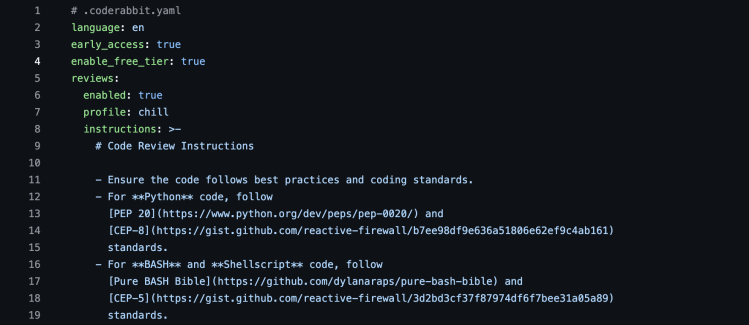
Key features include: Catch fast. Fix fast., TL;DR for your diff., Find the bugs. Skip the noise., Chat with the CodeRabbit bot directly., Most customizable tool., The reports you need., 1. Codebase intelligence, 2. External context.
CodeRabbit is commonly used for: Automating code reviews, Identifying hard-to-find bugs, Generating daily standup reports, Creating pre-merge code quality checks, Enhancing test coverage, Customizing coding guidelines.
CodeRabbit integrates with: Jira, Linear, GitHub, GitLab, Slack, Trello, Bitbucket, Web APIs.
Based on user reviews and social mentions, the most common pain points are: token usage, API costs.
Based on 48 social mentions analyzed, 13% of sentiment is positive, 88% neutral, and 0% negative.
