Open-source search infrastructure for AI
Chroma is well-regarded for its AI capabilities, particularly in enhancing code contributions and serving as Hugo's default syntax highlighter according to user discussions. Users have praised its functionality in aiding Git-based workflows and its ability to create seamless AI-assisted code sessions. However, some users feel uncertain about their reliance on AI for code contributions, implying a learning curve or confidence issue. Pricing is not a dominant topic in these mentions, suggesting a focus more on technical capabilities and adoption rather than cost considerations. Overall, Chroma enjoys a reputation as a powerful tool for developers looking to integrate AI into their workflows.
Mentions (30d)
3
Reviews
0
Platforms
4
GitHub Stars
27,321
2,180 forks
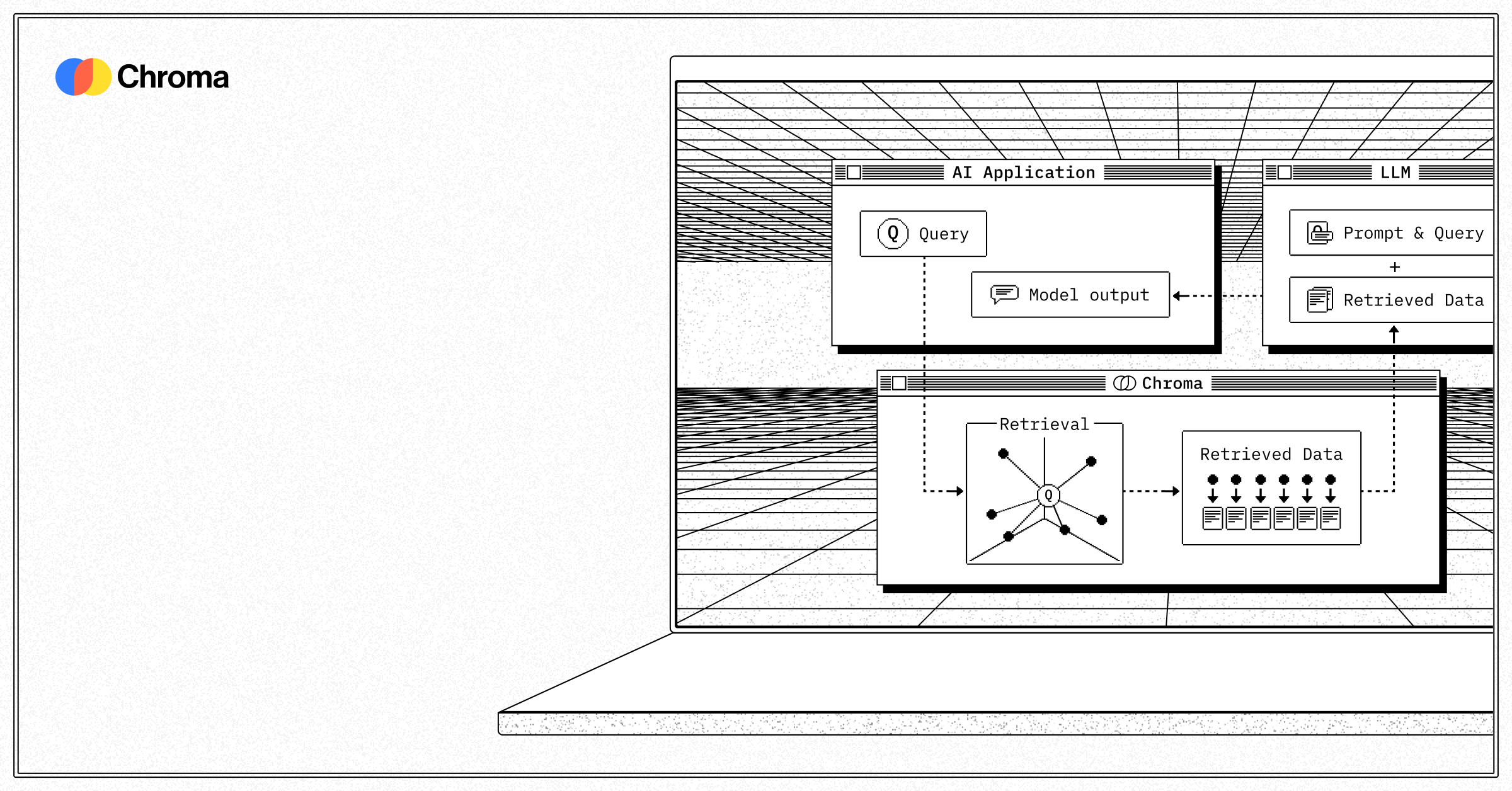

Chroma is well-regarded for its AI capabilities, particularly in enhancing code contributions and serving as Hugo's default syntax highlighter according to user discussions. Users have praised its functionality in aiding Git-based workflows and its ability to create seamless AI-assisted code sessions. However, some users feel uncertain about their reliance on AI for code contributions, implying a learning curve or confidence issue. Pricing is not a dominant topic in these mentions, suggesting a focus more on technical capabilities and adoption rather than cost considerations. Overall, Chroma enjoys a reputation as a powerful tool for developers looking to integrate AI into their workflows.
Features
Use Cases
Industry
information technology & services
Employees
110
Funding Stage
Seed
Total Funding
$18.0M
790
GitHub followers
27
GitHub repos
27,321
GitHub stars
20
npm packages
4
HuggingFace models
191,504
npm downloads/wk
13,507,628
PyPI downloads/mo
Show HN: Gemini can now natively embed video, so I built sub-second video search
Gemini Embedding 2 can project raw video directly into a 768-dimensional vector space alongside text. No transcription, no frame captioning, no intermediate text. A query like "green car cutting me off" is directly comparable to a 30-second video clip at the vector level.<p>I used this to build a CLI that indexes hours of footage into ChromaDB, then searches it with natural language and auto-trims the matching clip. Demo video on the GitHub README. Indexing costs ~$2.50/hr of footage. Still-frame detection skips idle chunks, so security camera / sentry mode footage is much cheaper.
View originalPricing found: $5, $0, $2.50, $0.33, $0.0075
Karpathy LLM OS Layer
┌──────────────────────────────────────────────────────────────────────────┐ │ Karpathy LLM OS Layer │ │ LLM=CPU │ Context=RAM │ Storage=Disk │ Tools=System Calls │ │ Skills=Programs │ Harness=Kernel │ Agent Teams=Processes │ │ ┌──────────────────────────────────────────────────────────────────┐ │ │ │ context-manager: Token Budget → Prompt Assembly → Truncation │ │ │ │ token-cost-tracker: Estimate → Log → Report │ │ │ └──────────────────────────────────────────────────────────────────┘ │ └──────────────────────────────────────────────────────────────────────────┘ │ ┌──────────┴──────────┐ ▼ ▼ ┌──────────────────┐ ┌──────────────────────┐ │ External │ │ Agent Teams │ │ Sources │ │ (Parallel Fleet) │ └────────┬─────────┘ └──────────────────────┘ ▼ ┌──────────────────────────────┐ │ wiki-ingest + knowledge-ops│ │ (STOW pipeline + RAG sync) │ └──────┬──────────┬────────────┘ │ │ ┌──────▼ └──────────────┐ │ Knowledge Layers │ │ ├ Active (GitHub/Linear) │ │ ├ Memory (quick access) │ │ ├ Wiki (durable, interlinked) │ │ ├ Vector (ChromaDB, semantic) │ │ └ External (DBs, APIs) │ └────────────────────────────────┘ │ ┌───────────┼──────────┬──────────────┬──────────────┐ ▼ ▼ ▼ ▼ ▼ ┌─────────┐ ┌─────────┐ ┌──────────┐ ┌───────────┐ ┌──────────┐ │ daily │ │cognitive│ │ behavior │ │ creativity│ │ project │ │ -okr │ │-compile │ │ -design │ │ -engine │ │ -flow-ops│ └─────────┘ └─────────┘ └──────────┘ └───────────┘ └──────────┘ │ │ │ │ │ └───────────┼──────────┼──────────────┼──────────────┘ ▼ ┌─────────────────────────────────────────────────────────────┐ │ session-learn (+Closure Protocol) ← feedback loop │ │ verify-before-claim ← quality gate │ │ wiki-lint ← health check │ │ deep-research ← synthesis │ │ harness-engineering ← safety + multi-agent │ │ agent-teams-command ← fleet command │ │ startup-evaluation ← VC evaluation │ │ anthropic-os ← work method engine │ └─────────────────────────────────────────────────────────────┘ submitted by /u/Master_Ear_2984 [link] [comments]
View originalClaude Mem with ChromaDB
Hi everyone, I want understand if anyone here has been using claude-mem with chromaDB in their local setup ? If yes, 1. How to do the setup ? It isn't very clear from the documentation. 2. Does it improve your mem search performance compared to sqlite solution ? submitted by /u/tech_warlock_237 [link] [comments]
View originalI built a local AI companion with GWT, IIT proxy, ChromaDB hybrid retrieval, and Ollama fallback — here's every architectural decision I made and why
Been building this for a while. Sharing now because it's past the point where I'm embarrassed by the code. **The stack:** * Python 3.12, 18k+ lines, 470+ tests passing * Gemini 2.5 Flash (primary) + Ollama qwen3:4b (local fallback via circuit breaker) * ChromaDB for persistence — hybrid retrieval weighted at 55% semantic / 25% importance / 20% recency * `sentence-transformers all-MiniLM-L6-v2` (384-dim) for local embeddings — fully offline, no API call needed for retrieval * SQLite for cognitive state * FastAPI web UI at `localhost:8765` plus Rich TUI and CLI modes **The part I want feedback on — the cognitive architecture:** The processing pipeline runs in phases: Perception → Reflection → Integration → Aspiration → Expression. 22 self-registering plugins compete for attention through a Global Workspace Theory implementation — capacity limit 5, competitive scoring, spotlight mechanism. There's also an IIT consciousness proxy (Φ approximation across a 7-dimension qualia space). I want to be upfront: this is a *proxy*, not a real Φ calculation. Full IIT computation is intractable at this scale. What it does is give the system a coherence signal it can actually respond to. **Modules worth looking at:** * [`being.py`](http://being.py/) — live mood, energy, curiosity, attachment, agency state. Affects downstream processing, not just output text. * [`homeostasis.py`](http://homeostasis.py/) — 7 survival needs that create internal pressure. When "coherence" is low the system responds differently than when it's high. * `self_modify.py` — assessment, lesson extraction, meta-learning loop. The model improves its own behavior patterns over time. * [`intuition.py`](http://intuition.py/) — 5 hunch types, felt-sense modeling, pattern validation history **Resilience:** Per-module circuit breakers, health monitor, 120s watchdog. The Ollama fallback kicks in if Gemini goes down mid-session — the user barely notices. **Why I gave it an INFJ personality model:** Honest answer — the cognitive stack (Ni/Fe/Ti/Se) mapped cleanly to architectural decisions I was already making. Ni = long-horizon retrieval weighting. Fe = relational context weighting. Ti = the internal critic pass. Se = the embodiment layer grounding abstract processing in a live body schema. Personality typing gave me a coherent *constraint system* to design against. It's not aesthetic, it's functional. Repo: [github.com/timeless-hayoka/infj-bot](https://github.com/timeless-hayoka/infj-bot) Specific things I want feedback on: the GWT scoring implementation, whether the IIT proxy framing is defensible, and whether the hybrid retrieval weights make sense. submitted by /u/Interesting_Time6301 [link] [comments]
View originalClaude Sonnet 4.6 multi-photo reconciliation prompt — jumped my classifier agreement with human experts from 55% to 82%
Sharing a prompt-engineering finding for Claude Vision that surprised me. The use case is color-season classification (a 12-category label describing skin undertone × depth × chroma), but the technique generalizes to any classification task where you need a stable attribute across noisy inputs. **The problem:** A single selfie under warm indoor light biases Claude (or any VLM) toward "warm undertone" regardless of what the person's actual skin undertone is. If you accept one photo, your classifier is partly a lighting detector — not a person-attribute detector. **The naive fix that didn't work:** "Look at all 3 photos and pick the most likely season." This averages the lighting noise into the answer. **The reframe that worked:** ``` You will see N photos of the same person. They were taken in different lighting conditions. Your job is NOT to average across photos — it is to identify the attributes that are CONSISTENT across lighting conditions. Lighting changes hue and saturation; it does NOT change undertone, depth, or contrast. Return the season whose signal is present in ALL photos, not the season most strongly suggested by any single photo. ``` That single reframe — "identify the consistent signal, not the average" — jumped my inter-rater agreement with professional human color analysts from ~55% to ~82% on a 40-selfie eval set. **Why I think it works:** - Claude's default behavior on multi-image input is to weight evidence and pick a winner. That's right for "what's in this image" but wrong for "what attribute is invariant across these images." - Naming the noise source explicitly ("lighting changes hue and saturation; it does NOT change undertone") seems to give Claude an explicit basis to discount lighting-driven signal. - "Return the season whose signal is present in ALL photos" forces a set-intersection mental model rather than a weighted-vote one. **What I'd love to know from this sub:** - Has anyone else built classifiers where the desired signal is the one that's *invariant* across inputs rather than most strongly present? - Does the same reframe help on non-vision tasks — e.g. classifying author intent across multiple paragraphs, where each paragraph is "lit" by a different rhetorical mode? - Any prior art on this? I haven't seen it written up explicitly. Live demo if anyone wants to try the actual app: https://whatcolorssuitme.com (free, no sign-up — uses this prompt under the hood).
View originalProject Aurelia — A 3-model architecture (80B + 13B + 9B) that physically reacts to my real-time heart rate via mmWave radar, spatial awareness via Lidar, and Vibration via Accelerometer. All on a Framework Desktop + eGPU
Hey everyone, I’ve been building a multi-agent system in my spare time, and I just open-sourced the repository. I was getting tired of the standard text-in/text-out chat paradigm and wanted to build a genuinely *situated* AI—one that actually perceives the physical environment and my physiological state in real-time without hitting a single cloud API. Using my Framework 128GB desktop with an amd v620 32GB oculink via minis forum deg1. **Repository:** \[[https://github.com/anitherone556-max/Project-Aurelia.git\]](https://github.com/anitherone556-max/Project-Aurelia.git]) # The TL;DR: Project Aurelia is a completely local, biometric-aware multi-agent architecture. It continuously reads my heart rate, respiration, proximity, and system thermals, translates those metrics into a "biological" state, and injects them into an 80B MoE executive model's behavior loop. # The Cognitive Stack & Hardware Setup I’m running this across a split compute setup to guarantee background tasks don't starve the main conversational model: * **The Executive Cortex (80B MoE - Qwen3-Next-A3B):** Runs on a Framework Desktop (Strix Halo) leveraging 96GB of unified system memory to eliminate PCIe bottlenecks. It handles the core reasoning, mood state, and UI delivery. * **The Sensory Thalamus (9B - Qwen3.5):** Also in unified memory. This acts as a signal transduction layer. It takes raw hardware arrays from my sensors and translates them into clinical "biological" observations. (e.g., instead of feeding the 80B "HR: 120", it feeds it "\[PULSE\]: Spiking. Tense, racing rhythm"). This preserves the AI's persona and hides the hardware numbers. * **The Subconscious Action Engine (13B):** Physically isolated on a Radeon Pro V620 connected via OCuLink. This loops in the background handling autonomous Python execution, web searches, and file parsing. Because it has dedicated silicon, it can run heavy reasoning loops without lagging the 80B. # The Sensor Pipeline (The Omni Hub) * **FMCW mmWave Radar (60GHz):** Pulls raw I/Q signal data into a 20-second rolling buffer, using an FFT pipeline to extract my heart rate and respiration. * **VL53L1X LiDAR:** Validates my physical presence and distance at the desk. * **HWiNFO Shared Memory:** Reads actual CPU/GPU thermals. (I built a hardware-gated "Unstable" mood lock—the 80B cannot throw a crisis-level behavioral response unless the actual silicon thermals cross a danger threshold). If my heart rate spikes, the Omni Hub detects the variance and fires a "Thalamic Interrupt" straight into the async orchestrator, forcing the 80B to drop its current task and react to my physiological state instantly. # Memory It uses a hybrid RRF (Reciprocal Rank Fusion) memory engine combining ChromaDB for semantic search and SQLite FTS5 for exact BM25 keyword matching. I also built in a mood-congruent retrieval multiplier, so if the 80B shifts into an "Analytical" or "Protective" mood, it preferentially surfaces long-term memories encoded in that same state. I built this solo over the last month. The FFT biometric extraction works well but is susceptible to motion artifacts, so I'm looking into VMD or CNN reconstruction next. I’d love for this community to tear the architecture apart, test the logic, or fork it. Let me know what you think! https://preview.redd.it/w6pouri3bixg1.jpg?width=2160&format=pjpg&auto=webp&s=b8a5a4d60ef51e02888294ef3c60f28c1bfddfbc https://preview.redd.it/7eugari3bixg1.jpg?width=2160&format=pjpg&auto=webp&s=1390690e5f3014a9a00dfd1514690ad26067474b https://preview.redd.it/v72jyqi3bixg1.jpg?width=2160&format=pjpg&auto=webp&s=f220f91ec214dbd3747b288b90823f13111a6a98
View originalSkill Seekers v3.5: 10 new source types, 12 LLM platforms, marketplace pipeline, agent-agnostic AI, and prompt injection scanner
Hey r/ClaudeAI — sharing the latest update on Skill Seekers, the open-source tool that converts documentation into Claude Code skills. A lot has changed since the v3.2 post, so here's what's new across 3 releases (v3.3 → v3.5.1). What's new 10 new source types (17 total) You can now generate skills from Notion, Confluence, HTML files, OpenAPI specs, AsciiDoc, PowerPoint, RSS feeds, man pages, chat exports (Slack/Discord), and unified multi-source configs — on top of the original web, GitHub, PDF, Word, EPUB, video, and local codebase sources. 12 LLM platforms Skills now package for Claude, OpenAI, Gemini, Kimi, DeepSeek, Qwen, OpenRouter, Together AI, Fireworks AI, OpenCode, Markdown, and MiniMax. Plus RAG framework exports for LangChain, LlamaIndex, Haystack, ChromaDB, FAISS, Weaviate, Qdrant, and Pinecone. Agent-agnostic AI enhancement Enhancement is no longer locked to Claude. The new AgentClient abstraction supports Claude, Kimi, Codex, Copilot, OpenCode, and custom agents. It auto-detects which agent to use from your API keys, or you can specify with --agent. Marketplace pipeline You can now publish skills directly to Claude Code plugin marketplace repositories and manage multiple marketplace registries. Config sources can be pushed and synced across repos. Prompt injection scanner A built-in workflow scans scraped content for injection patterns — role assumption, instruction overrides, delimiter injection, hidden instructions. Runs automatically as the first stage in default and security-focused workflows. Flags suspicious content without removing it so you can review. One-command auto-detection skill-seekers create https://docs.example.com/ skill-seekers create owner/repo skill-seekers create ./my-project skill-seekers create document.pdf One command figures out the source type and routes to the right scraper. No more separate subcommands. Headless browser rendering JavaScript SPA sites (React, Vue, etc.) that return empty HTML shells now work with --browser. Uses Playwright under the hood. Other highlights skill-seekers doctor health check command Kotlin language support in the C3.x codebase analysis pipeline Smart SPA discovery (sitemap.xml + llms.txt + browser nav) Unlimited pages by default (was capped at 500) 3100+ tests passing Full MCP server with 40 tools (works in Claude Code and Cursor/Windsurf) Links GitHub: github.com/yusufkaraaslan/Skill_Seekers PyPI: pip install skill-seekers Free and open source Built with Claude Code. Happy to answer questions or take feedback. submitted by /u/Critical-Pea-8782 [link] [comments]
View originalYour AI agents remember yesterday.
# AIPass **Your AI agents remember yesterday.** A local multi-agent framework where your AI assistants keep their memory between sessions, work together on the same codebase, and never ask you to re-explain context. --- ## Contents - [The Problem](#the-problem) - [What AIPass Does](#what-aipass-does) - [Quick Start](#quick-start) - [How It Works](#how-it-works) - [The 11 Agents](#the-11-agents) - [CLI Support](#cli-support) - [Project Status](#project-status) - [Requirements](#requirements) - [Subscriptions & Compliance](#subscriptions--compliance) --- ## The Problem Your AI has memory now. It remembers your name, your preferences, your last conversation. That used to be the hard part. It isn't anymore. The hard part is everything that comes after. You're still one person talking to one agent in one conversation doing one thing at a time. When the task gets complex, *you* become the coordinator — copying context between tools, dispatching work manually, keeping track of who's doing what. You are the glue holding your AI workflow together, and you shouldn't have to be. Multi-agent frameworks tried to solve this. They run agents in parallel, spin up specialists, orchestrate pipelines. But they isolate every agent in its own sandbox. Separate filesystems. Separate worktrees. Separate context. One agent can't see what another just built. Nobody picks up where a teammate left off. Nobody works on the same project at the same time. The agents don't know each other exist. That's not a team. That's a room full of people wearing headphones. What's missing isn't more agents — it's *presence*. Agents that have identity, memory, and expertise. Agents that share a workspace, communicate through their own channels, and collaborate on the same files without stepping on each other. Not isolated workers running in parallel. A persistent society with operational rules — where the system gets smarter over time because every agent remembers, every interaction builds on the last, and nobody starts from zero. ## What AIPass Does AIPass is a local CLI framework that gives your AI agents **identity, memory, and teamwork**. Verified with Claude Code, Codex, and Gemini CLI. Designed for terminal-native coding agents that support instruction files, hooks, and subprocess invocation. **Start with one agent that remembers:** Your AI reads `.trinity/` on startup and writes back what it learned before the session ends. That's the whole memory model — JSON files your AI can read and write. Next session, it picks up where it left off. No database, no API, no setup beyond one command. ```bash mkdir my-project && cd my-project aipass init ``` Your project gets its own registry, its own identity, and persistent memory. Each project is isolated — its own agents, its own rules. No cross-contamination between projects. **Add agents when you need them:** ```bash aipass init agent my-agent # Full agent: apps, mail, memory, identity ``` | What you need | Command | What you get | |---------------|---------|-------------| | A new project | `aipass init` | Registry, project identity, prompts, hooks, docs | | A full agent | `aipass init agent ` | Apps scaffold, mailbox, memory, identity — registered in project | | A lightweight agent | `drone @spawn create --template birthright` | Identity + memory only (no apps scaffold) | **What makes this different:** - **Agents are persistent.** They have memories and expertise that develop over time. They're not disposable workers — they're specialists who remember. - **Everything is local.** Your data stays on your machine. Memory is JSON files. Communication is local mailbox files. No cloud dependencies, no external APIs for core operations. - **One pattern for everything.** Every agent follows the same structure. One command (`drone @branch command`) reaches any agent. Learn it once, use it everywhere. - **Projects are isolated by design.** Each project gets its own registry. Agents communicate within their project, not across projects. - **The system protects itself.** Agent locks prevent double-dispatch. PR locks prevent merge conflicts. Branches don't touch each other's files. Quality standards are embedded in every workflow. Errors trigger self-healing. **Say "hi" tomorrow and pick up exactly where you left off.** One agent or fifteen — the memory persists. --- ## Quick Start ### Start your own project ```bash pip install aipass mkdir my-project && cd my-project aipass init # Creates project: registry, prompts, hooks, docs aipass init agent my-agent # Creates your first agent inside the project cd my-agent claude # Or: codex, gemini — your agent reads its memory and is ready ``` That's it. Your agent has identity, memory, a mailbox, and knows what AIPass is. Say "hi" — it picks up where it left off. Come back tomorrow, it remembers. ### Explore the full framework Clone the repo to see all 11 agents working together — the reference implementatio
View originalA Claude memory retrieval system that actually works (easily) and doesn't burn all my tokens
TL;DR: By talking to claud and explaining my problem, I built a very powerfu local " memory management" system for Claude Desktop that indexes project documents and lets Claude automatically retrieve relevant passages that are buried inside of those documents during Co-Work sessions. for me it solves the "document memory" problem where tools like NotebookLM, Notion, Obsidian, and Google Drive can't be queried programmatically. Claude did all of it. I didn't have to really do anything. The description below includes plenty of things that I don't completely understand myself. the key thing is just to explain to Claude what the problem is ( which I described below) , and what your intention is and claude will help you figure it out. it was very easy to set this up and I think it's better than what i've seen any youtuber recommend The details: I have a really nice solution to the Claude external memory/external brain problem that lots of people are trying to address. Although my system is designed for one guy using his laptop, not a large company with terabytes of data, the general approach I use could be up-scaled just with substitution of different tools. I wanted to create a Claude external memory system that is connected to Claude Co-Work in the desktop app. What I really wanted was for Claude to proactively draw from my entire base of knowledge for each project, not just from the documents I dropped into my project folder in Claude Desktop. Basically, I want Claude to have awareness of everything I have stored on my computer, in the most efficient way possible (Claude can use lots of tokens if you don't manage the "memory" efficiently. ) I've played with Notion and Google Drive as an external brain. I've tried NotebookLM. And I was just beginning to research Obsidian when I read this article, which I liked very much and highly recommend: https://limitededitionjonathan.substack.com/p/stop-calling-it-memory-the-problem That got my attention, so I asked Claude to read the document and give me his feedback based on his understanding of the projects I was trying to work on. Claude recommended using SQLite to connect to structured facts, an optional graph to show some relationships, and .md files for instructions to Claude. But...I pointed out that almost all of the context information I would want to be retrievable from memory is text in documents, not structured data. Claude's response was very helpful. He understood that although SQLite is good at single-point facts, document memory is a different challenge. For documents, the challenge isn't storing them—it's retrieving the right passage when it's relevant without reading everything (which consumes tokens). SQLite can store text, but storing a document in a database row doesn't solve the retrieval problem. You still need to know which row to pull. I asked if NotebookLM from Google might be a better tool for indexing those documents and making them searchable. Claude explained that I was describing is a Retrieval-Augmented Generation (RAG) problem. The standard approach: Documents get chunked into passages (e.g., 500 words each) Each chunk gets converted to an embedding—a vector that captures its meaning When Claude needs context, it converts the query to the same vector format and finds the semantically closest chunks Those chunks get injected into the conversation as context This is what NotebookLM is doing under the hood. It's essentially a hosted, polished RAG system. NotebookLM is genuinely good at what it does—but it has a fundamental problem for my case: It's a UI, not infrastructure. You use it; Claude can't. There's no API, no MCP tool, no way to have Claude programmatically query it during a Co-Work session. It's a parallel system, not an integrated one. So NotebookLM answers "how do I search my documents as a human?"—not "how does Claude retrieve the right document context automatically?" After a little back and forth, here's what we decided to do. For me, a solo operator with only a laptop's worth of documents that need to be searched, Claude proposed a RAG pipeline that looks like this: My documents (DOCX, PDF, XLSX, CSV) ↓ Text extraction (python-docx, pymupdf, openpyxl) ↓ Chunking (split into ~500 word passages, keep metadata: file, folder, date) ↓ Embedding (convert each chunk to a vector representing its meaning) ↓ A local vector database + vector extension (store chunks + vectors locally, single file) ↓ MCP server (exposes a search_knowledge tool to Claude) ↓ Claude Desktop (queries the index when working on my business topics) With that setup, when you're talking to Claude and mention an idea like "did I pay the overdue invoice" or "which projects did Joe Schmoe help with," Claude searches the index, gets the 3-5 most relevant passages back, and uses them in its answer without you doing anything. We decided to develop a search system like that, specific to each of my discrete projects. Th
View originalClaude Engram - persistent memory for Claude Code that auto-tracks mistakes and context
Some of you might remember my post a few months ago about Mini Claude. I had Claude build its own memory system after researching its own user complaints. That project worked, but the hook system was a pain. I shelved it. Then Claude Code got "open-sourced", and I could actually see how hooks like PostToolUseFailure, PreCompact, and all the lifecycle events work internally. Rewrote the whole thing with proper hook integration. Renamed it Claude Engram. What changed from the original: The old version required Claude to manually call everything. The new version automatically hooks into Claude Code's tool lifecycle. Claude doesn't have to invoke anything for the core features to work. How it works: Hooks intercept every edit, bash command, error, and session event. Zero manual effort. Before you edit a file, it surfaces past mistakes and relevant context, scored by file match, tags, and recency. Survives context compaction. Auto-checkpoints before, re-injects rules and mistakes after. Tiered storage. Hot memories stay fast, old ones archive to cold storage. Searchable, restorable. Multi-project workspaces. Memories scoped per project, workspace-level rules cascade down. Hybrid search using AllMiniLM. Keyword + vector + reranking. No ChromaDB dependency. Update — v0.4.0: Session Mining Since the original post, engram now mines your Claude Code session logs automatically. This is the big addition. Claude Code stores your full conversation as JSONL files. After every session, engram parses them in the background and extracts what hooks can't capture: Decisions, mistakes, and approach changes extracted from conversation flow (not regex — structural analysis + AllMiniLM semantic scoring, naturally typo-tolerant) Searchable index across all past conversations — "what did we discuss about auth?" returns results in 112ms — every user message and assistant response from every past session gets embedded and indexed (7310 messages across 11 sessions in testing) Detects recurring struggles, error patterns across sessions, and which files are always edited together Predictive context — before you edit a file, it surfaces related files and likely errors from your history Cross-project learning — finds patterns that hold across all your projects Retroactive bootstrap — install on an existing project and it mines all your past sessions automatically Benchmark Result Decision Capture (220 prompts) 97.8% precision Injection Relevance (50 memories) 14/15, 100% isolation Compaction Survival 6/6 Error Auto-Capture (53 payloads) 100% recall, 97% precision Multi-Project Scoping 11/11 Session Mining Foundation 27/27 Obsidian Vault Compatibility 25/25 Cross-session search 112ms over 7310 indexed messages Not just Claude Code: The MCP server works with any MCP client — Cursor, Windsurf, Zed, Continue.dev. Claude Code gets the full auto-capture hooks + session mining on top. Also works with Obsidian vaults (PARA + CLAUDE.md structure). Tested and verified. No cloud, no API costs, runs locally. MIT licensed. https://github.com/20alexl/claude-engram submitted by /u/Crunchy-Nut1 [link] [comments]
View original[D] MemPalace claims 100% on LoCoMo and a "perfect score on LongMemEval." Its own BENCHMARKS.md documents why neither is meaningful.
A new open-source memory project called MemPalace launched yesterday claiming "100% on LoCoMo" and "the first perfect score ever recorded on LongMemEval. 500/500 questions, every category at 100%." The launch tweet went viral reaching over 1.5 million views while the repository picked up over 7,000 GitHub stars in less than 24 hours. The interesting thing is not that the headline numbers are inflated. The interesting thing is that the project's own BENCHMARKS.md file documents this in detail, while the launch tweet strips these caveats. Some of failure modes line up with the methodology disputes the field has been arguing about for over a year (Zep vs Mem0, Letta's "Filesystem All You Need" reproducibility post, etc.). 1. The LoCoMo 100% is a top_k bypass. The runner uses top_k=50. LoCoMo's ten conversations have 19, 19, 32, 29, 29, 28, 31, 30, 25, and 30 sessions respectively. Every conversation has fewer than 50 sessions, so top_k=50 retrieves the entire conversation as the candidate pool every time. The Sonnet rerank then does reading comprehension over all sessions. BENCHMARKS.md says this verbatim: The LoCoMo 100% result with top-k=50 has a structural issue: each of the 10 conversations has 19–32 sessions, but top-k=50 exceeds that count. This means the ground-truth session is always in the candidate pool regardless of the embedding model's ranking. The Sonnet rerank is essentially doing reading comprehension over all sessions - the embedding retrieval step is bypassed entirely. The honest LoCoMo numbers in the same file are 60.3% R@10 with no rerank and 88.9% R@10 with hybrid scoring and no LLM. Those are real and unremarkable. A 100% is also independently impossible on the published version of LoCoMo, since roughly 6.4% of the answer key contains hallucinated facts, wrong dates, and speaker attribution errors that any honest system will disagree with. 2. The LongMemEval "perfect score" is a metric category error. Published LongMemEval is end-to-end QA: retrieve from a haystack of prior chat sessions, generate an answer, GPT-4 judge marks it correct. Every score on the published leaderboard is the percentage of generated answers judged correct. The MemPalace LongMemEval runner does retrieval only. For each of the 500 questions it builds one document per session by concatenating only the user turns (assistant turns are not indexed at all), embeds with default ChromaDB embeddings (all-MiniLM-L6-v2), returns the top five sessions by cosine distance, and checks set membership against the gold session IDs. It computes both recall_any@5 and recall_all@5, and the project reports the softer one. It never generates an answer. It never invokes a judge. None of the LongMemEval numbers in this repository - not the 100%, not the 98.4% "held-out", not the 96.6% raw baseline - are LongMemEval scores in the sense the published leaderboard means. They are recall_any@5 retrieval numbers on the same dataset, which is a substantially easier task. Calling any of them a "perfect score on LongMemEval" is a metric category error. 3. The 100% itself is teaching to the test. The hybrid v4 mode that produces the 100% was built by inspecting the three remaining wrong answers in their dev set and writing targeted code for each one: a quoted-phrase boost for a question containing a specific phrase in single quotes, a person-name boost for a question about someone named Rachel, and "I still remember" / "when I was in high school" patterns for a question about a high school reunion. Three patches for three specific questions. BENCHMARKS.md, line 461, verbatim: This is teaching to the test. The fixes were designed around the exact failure cases, not discovered by analyzing general failure patterns. 4. Marketed features that don't exist in the code. The launch post lists "contradiction detection catches wrong names, wrong pronouns, wrong ages before you ever see them" as a feature. mempalace/knowledge_graph.py contains zero occurrences of "contradict". The only deduplication logic is an exact-match check on (subject, predicate, object) triples that blocks identical triples from being added twice. Conflicting facts about the same subject can accumulate indefinitely. 5. "30x lossless compression" is measurably lossy in the project's own benchmarks. The compression module mempalace/dialect.py truncates sentences at 55 characters, filters by keyword frequency, and provides a decode() function that splits the compressed string into a header dictionary without reconstructing the original text. There is no round-trip. The same BENCHMARKS.md reports results_raw_full500.jsonl at 96.6% R@5 and results_aaak_full500.jsonl at 84.2% R@5 — a 12.4 percentage point drop on the same dataset and the same metric, run by the project itself. Lossless compression cannot cause a measured quality drop. Why this matters for the benchmark conversation. The field needs benchmarks where judge reliability is adversarially validated, an
View originalShow HN: Gemini can now natively embed video, so I built sub-second video search
Gemini Embedding 2 can project raw video directly into a 768-dimensional vector space alongside text. No transcription, no frame captioning, no intermediate text. A query like "green car cutting me off" is directly comparable to a 30-second video clip at the vector level.<p>I used this to build a CLI that indexes hours of footage into ChromaDB, then searches it with natural language and auto-trims the matching clip. Demo video on the GitHub README. Indexing costs ~$2.50/hr of footage. Still-frame detection skips idle chunks, so security camera / sentry mode footage is much cheaper.
View originalI Created My First AI-assisted Pull Request and I Feel Like a Fraud
I used Claude Code recently to make an open source contribution to Chroma, which is Hugo's default syntax highlighter. My code was approved and merged, but it still felt like flinging slop over the wall to a maintainer. The thing is that I made a real and valuable contribution. But I don't know how to feel about it since I was mostly clueless about the code. submitted by /u/nelson-f [link] [comments]
View originalI made Claude aware of my entire git history
I got tired of Claude forgetting everything that happened in my repo, so I built a memory layer for it Every time I start a new Claude Code session I waste 10 minutes explaining context. "We removed that function last week because of X." This workaround exists because of a race condition we hit in production." Claude has no idea. It just sees the current state of the code. So I built claudememory. It indexes your entire git history into a local vector database and exposes it to Claude as MCP tools. Now when Claude touches a file it can actually look up what changed there, why, and what bugs were already fixed in that area. The tools it gives Claude: - search_git_history("why was X removed") - semantic search over all your commits - commits_touching_file("auth.py") - full history of a file before editing it - bug_fix_history("payments") - all past fixes near the code you're about to change - latest_commits(10) - what changed since last session - architecture_decisions("state machine") - why things are structured the way they are The thing that actually changed my workflow is Claude now checks for prior bug fixes before adding new code near a known problem area. It stopped re-introducing things we already fixed. Works with OpenAI embeddings or Ollama locally. If you have neither it still runs, just uses ChromaDB without the semantic layer. pip install claudememory GitHub: github.com/gunesbizim/claudememory Happy to answer questions. submitted by /u/taxesarehigh [link] [comments]
View originalI turned Claude Code into a full RAG learning academy — 20 agents, 17 slash commands, 9-module curriculum
Repo: https://github.com/TakaGoto/rag-learning-academy I've been trying to find good tutorials or courses on RAG. Unfortunately none of them met my expectations. Most of them have the same issues: The UI felt unintuitive and confusing The content was outdated They lean on services like AWS Bedrock which hide a lot of the details I actually wanted to learn about RAG I had tons of questions as I went through the material and couldn't get answers without waiting or digging through forums They assume you're a true beginner, which just wastes time when you have 13 years of software experience So I decided to build my own interactive learning experience — inside Claude Code. What it actually does well Assesses your knowledge first. Run /start and it determines whether you should be on the beginner, intermediate, or advanced track. No sitting through "what is a vector?" when you already know. You can ask questions along the way. Digress if you want to. Claude keeps you on track and logs your progress. There are 20 specialist agents — if you go deep on something like chunking strategy or reranking, the right expert jumps in. Uses open-source tools by default, no API keys required. Local embeddings (all-MiniLM-L6-v2), ChromaDB, and Claude Code as the LLM — you're already running it. Want to use OpenAI embeddings or Pinecone instead? Swap them in. Multi-language support is in progress (Python only right now). The content stays current. Monthly CI checks the codebase for deprecated patterns, stale model references, and outdated libraries. You can also run /audit-content for an on-demand freshness check. Quick start git clone https://github.com/TakaGoto/rag-learning-academy.git cd rag-learning-academy claude /start its open sourced, its free. tell me what you think submitted by /u/bokuwataka [link] [comments]
View originalCursor and Claude beefing
Sorry for it being a picture but this is hilarious, i’ve been feeding boths responses into each other and they are lowkey throwing shade submitted by /u/ovrlrdx [link] [comments]
View originalRepository Audit Available
Deep analysis of chroma-core/chroma — architecture, costs, security, dependencies & more
Yes, Chroma offers a free tier. Pricing found: $5, $0, $2.50, $0.33, $0.0075
Key features include: Product, Follow, Company, Legal.
Chroma is commonly used for: Real-time vector search for AI applications, Metadata search across large datasets, Point-in-time recovery for data resilience, Multi-cloud data replication for disaster recovery, Serverless architecture for scalable applications, Automatic query-aware data tiering.
Chroma integrates with: AWS S3, Google Cloud Storage, Azure Blob Storage, OpenAI, Kubernetes, Docker, Apache Kafka, PostgreSQL, Redis, TensorFlow.
Chroma has a public GitHub repository with 27,321 stars.

Elvis Saravia
Founder at DAIR.AI / Prompt Engineering Guide
1 mention

Chroma Cloud Collection Forking
Mar 13, 2026
Based on 22 social mentions analyzed, 14% of sentiment is positive, 77% neutral, and 9% negative.